Tag Archives: Robotics

Presenting with a Robot – True Hackathon Style!

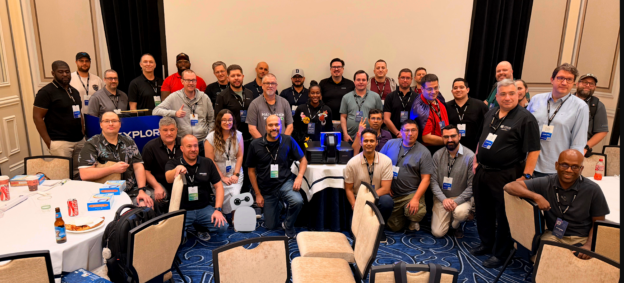
Every year at the VMware Explore Hackathon in Las Vegas, we kick off the evening with the usual housekeeping. You know the drill: going over the schedule, explaining how solo hackers get matched into teams, running through the hardware prizes, introducing our guest mentors, and explaining how the judging works. Usually, that means standing on stage with a clicker and talking through a slide deck.

This year, I had Kit, my Reachy Mini robot, sitting on my desk. And whilst there are plenty of fun demos you can run with a robotic head, I thought: why should I do all the talking when I have a robot capable of expressive gestures, speech synthesis, and head tracking?

Why not let Kit present the hackathon opening to the room?

It sounded like a brilliant idea on paper. In practice, making a physical robot co-present on a conference stage in front of a live audience requires a lot more than just piping text into a speech model. The robot needs stage presence. It needs to look at the audience, turn its head to glance at the slide on the big projector screen, execute expressive antenna and head motions, and change the slides automatically at the right moment.

So we built reachy-mini-presenter, an open source presentation app for Reachy Mini. Here is how it came together, what made it work, and what we learned when taking a robot on stage.

See Kit in Action at the Hackathon

Before getting into the code and architecture, here is the live video of Kit co-presenting the hackathon kickoff at VMware Explore 2026:

Hearing a tiny robot announce to a ballroom full of developers that it was my virtual robotic slave, introduce Bob Plankers, warn everyone that they will be judged, and hand back to its human overlord set exactly the right tone for the evening.

What It Takes to Share a Stage With a Robot

Giving a speech through a robot is easy if you do not care how it looks. You send an audio stream to a speaker and let the robot sit there motionless. But that completely defeats the point of using an embodied robot.

To feel like a genuine co-presenter on stage, the system had to solve four key problems:

  • Keep the slides on the big screen in lockstep with the spoken audio without requiring a human to hit a clicker.
  • Synchronise physical head gaze and antenna emotions to the exact words being spoken.
  • Fit naturally into standard presentation workflows so anyone can write or edit a deck in Google Slides, PowerPoint, or Markdown.
  • Run reliably in a convention centre environment where venue Wi-Fi is notoriously unpredictable.

If any of those pieces fail, the illusion breaks immediately.

The Speaker Notes Are the Script

The biggest breakthrough in the design was deciding where the robot directives should live. We did not want a complex external timeline editor or a custom visual choreography tool. Presenters already write their scripts in speaker notes.

So we turned speaker notes into a stage script by supporting inline directives. You write your normal notes, and sprinkle in robot commands using brackets:
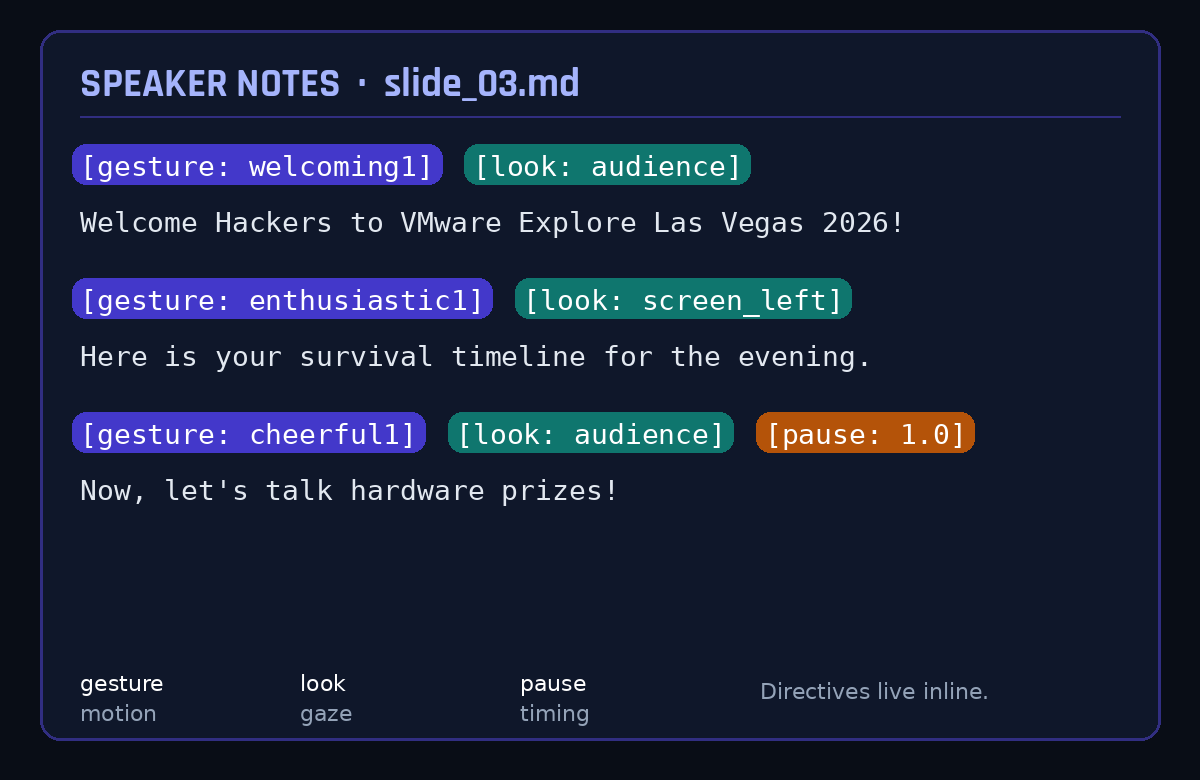
The parser extracts these directives on the fly:

  • Gaze orientations orient the robot head dynamically toward the audience or the presentation screen.
  • Expressive motion gestures trigger Pollen Robotics recorded move trajectories.
  • Timing pauses let the robot wait for audience laughter or applause before resuming speech.
  • Head wobbles and antenna drift run continuously during speech to mimic natural human speaking cadences.

When Kit referenced the timeline slide on the projector, it turned its head toward the screen on its left, delivered the line, and then turned back to face the audience. That single behaviour transformed it from a talking speaker into a presenter.

Under the Hood: Three Pieces, One Show

The application runs as a local FastAPI service that integrates natively into the Reachy Mini desktop application ecosystem.
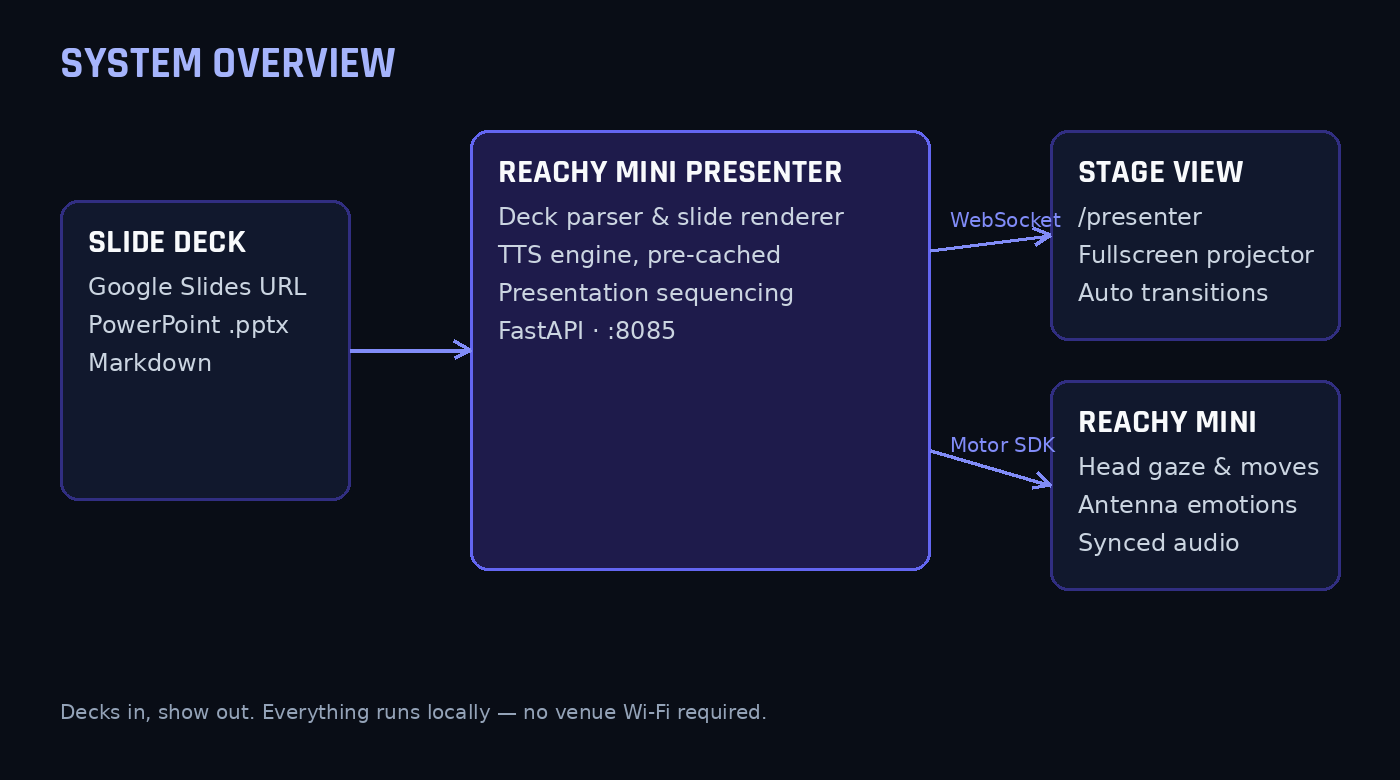
The design separates presentation into two browser views:

  • The presentation stage view at slash presenter is projected onto the conference hall screens, showing high-resolution rendered slide graphics that transition automatically via WebSockets.
  • The control dashboard view at the root URL runs on the operator laptop, providing slide thumbnails, live speaker note previews, playback controls, and manual gesture triggers.

For deck ingestion, we built support for Google Slides, PowerPoint files, and Markdown. For Google Slides, you simply paste the presentation share link into the dashboard. The app fetches the deck, parses the shapes and notes, renders high-resolution slide images using LibreOffice or Keynote CLI, and caches everything locally.

The Golden Rule: Never Trust Venue Wi-Fi

If you take only one lesson away from this post, let it be this: never rely on real-time cloud text-to-speech during a live stage presentation.

Conference Wi-Fi in a room packed with hundreds of engineers is always a gamble. If an API call stutters or drops packets, the robot freezes mid-sentence, the slide does not advance, and everyone stares at an awkward silent robot.

To avoid this, reachy-mini-presenter pre-renders and caches every spoken phrase locally as WAV files before the presentation starts. We supported local neural voices via Kokoro and Edge TTS, along with cross-platform native audio playback engines:

  • macOS uses the native afplay utility.
  • Windows uses the low-level Windows multimedia MCI sound subsystem.
  • Linux uses ffplay or mplayer.

Because the entire audio pipeline is cached locally on the laptop before walking onto the stage, the presentation runs with zero network dependency during the actual talk.

Stage Fright: Notes From a Live Robot

Putting hardware on stage always delivers a few surprises. Here is what we had to debug:

  • Audio levels in an exhibition hall need serious headroom because a desk speaker that sounds loud in an office is virtually inaudible in a hall with several hundred people talking. We ended up with a strategicly placed mic hooked directly into the venue sound system.
  • Motor kinematics limits triggered warnings during fast transitions when moving between an extreme look-up pose and an enthusiastic celebration gesture in one frame, which we smoothed out with easing curves.
  • Comic timing requires deliberate pause directives because in early dry runs the robot steamrolled straight through punchlines without waiting for the room to laugh. Inserting explicit one-second and two-second pause directives after jokes allowed room for audience reaction before the next slide loaded.

Your Turn: Run It Yourself

The best part about the Reachy Mini ecosystem is that you do not need to clone git repositories or mess around in a terminal to get this working.

If you have a Reachy Mini, you can install and run the app with one click directly inside the official Reachy Mini Control desktop app. Open the app catalog in Reachy Mini Control, search for Reachy Mini Presenter, and hit install. It downloads into the robot app environment and launches right from your dashboard.
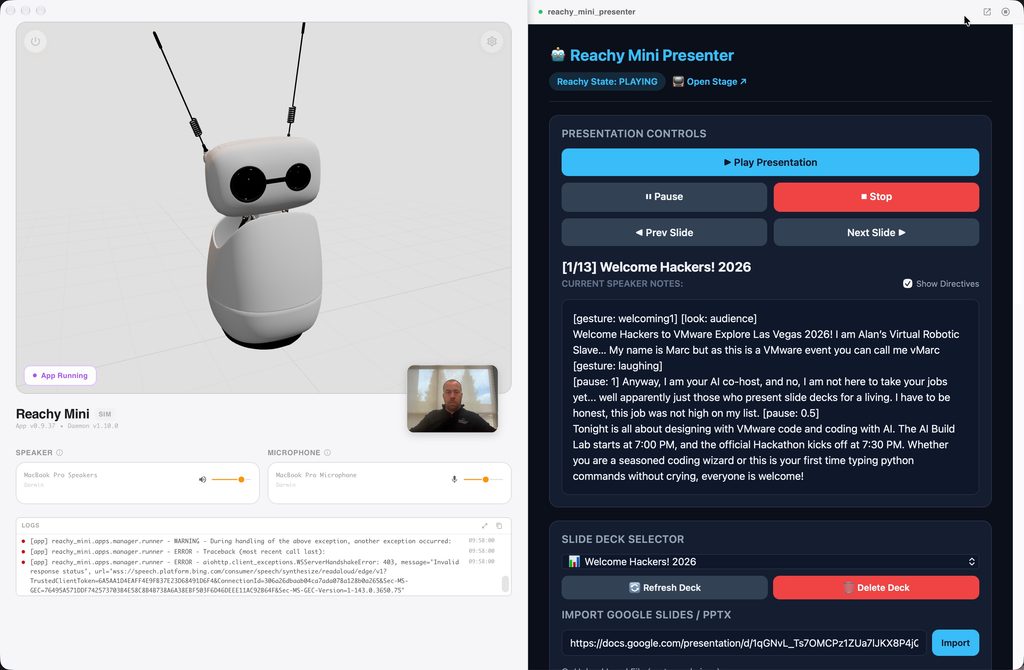
I also created a dedicated website for the project on Hugging Face Spaces:

Reachy Mini Presenter on Hugging Face

The site includes an interactive preview showing how the robot moves and reacts to slide directives, a full reference for speaker note tags, and a catalog of supported gestures.

Once you launch the app, you will have two interfaces ready to go:

  • The control dashboard at http://localhost:8085/ lets you load decks, review speaker notes, and drive the presentation.
  • The presentation stage at http://localhost:8085/presenter goes onto a projector or secondary display to show fullscreen slides that advance automatically in sync with the robot.

If you want to poke around under the hood, tweak the Python code, or add custom animations, the source code is completely open on the Hugging Face Space repository as well.

Wrapping Up

Building reachy-mini-presenter was one of the most rewarding robotics projects I have worked on recently. It took Kit from being an interesting desk gadget to an active, helpful participant in a major community event. The reaction from the room at VMware Explore was incredible, and seeing developers laugh and cheer as a robot explained hackathon rules made all the late-night motor tuning completely worth it.

Give it a spin with your own slide decks, experiment with the speaker note directives, and let me know what you build!

The hackathon overall was a great success and always one of my favourite sessions at VMware Explore, thanks to everyone who attended and the winners of prizes, some awesome innovations were created as always!
Giving Muse a Body: Connecting a Reachy Mini Over Tailscale

Recently I have been messing around with Kit, my Reachy Mini, on my desk, and whilst there are plenty of ways to make a robot talk, that was not really the point. I wanted to talk across the room to the same Muse (Meta AI) that already knows my calendar, my email and my house – and hear it answer back through the robot. Sounds simple, right? Let me tell you, it was not. But it works like a charm now, so I thought I would share how we got there, including the design we threw away.

What “connected” had to mean

A quick demo is easy, I have seen plenty of them. You pipe a microphone into a model and play back whatever comes out. That was not what I wanted. The reply had to come from my actual Muse agent – with its memory, its Gmail and calendar connections and its knowledge of the house – not a raw model starting cold every time. And it all had to stay private: no robot API exposed to the internet, no audio leaving the house except as a transcript, and definitely no robot shouting out loud when I am away or asleep.

Get those three things right – same agent, local audio, private transport – and, honestly, the rest of the design pretty much falls out of them.

First, I went down the wrong route

My first thought was the obvious one, it is what I would normally do. Sparky, my existing local voice stack (thanks to Alexis Gallagher), would just call an OpenAI-compatible chat endpoint and get Muse’s replies back. Well, that falls over pretty quickly here, and it is worth understanding why. The Meta Model API is OpenAI-compatible, but it serves raw models. A raw model has no access to my Muse agent’s memory, calendar, email or tools, so the answers would have sounded perfectly plausible whilst knowing nothing that actually matters.

On top of that, Muse has no inbound endpoint that a server in my house can push utterances to. So we flipped it round: instead of Sparky calling Muse, Muse would poll Sparky. That one reversal is basically the whole architecture. Everything else is just plumbing around it.

Let Sparky own the audio – RIP bridge.py

Next I tried writing a standalone script – bridge.py – to do the whole job itself: talk to the Reachy daemon, grab the microphone, transcribe everything and play the replies. It did not last long. Sparky already owned the audio device exclusively through PortAudio, and the Reachy daemon was deliberately running in no-media mode. Two processes fighting over the same device was never going to end well.

So bridge.py was retired on 18 October 2026, and I let Sparky keep every audio job: capture via PortAudio, wake and turn detection, Faster Whisper transcription on the GPU, and Kokoro text-to-speech at 24 kHz feeding the robot’s head animation and lip-sync. Muse’s side starts at the transcript and ends at the reply text. Much simpler, and nobody is fighting over the hardware.

Two channels over Tailscale, nothing open to the internet

The robot itself, “Kit”, is a Reachy Mini Lite, USB-tethered to my Alienware m15 Linux box. That same box also runs OpenClaw in a container. The Muse Voice Link bridge runs on there too, bound only to its Tailscale address, 100.81.48.19 on port 8422. Muse’s machine is on the same tailnet at 100.109.159.50. Plain HTTP is fine inside that link because Tailscale’s WireGuard transport is already encrypting it – but only if the bind is honest. I checked with ss -tlnp that nothing was listening on 0.0.0.0:8422.

KIT – REACHY MINI LITE (USB)
microphone array · speaker · head movement
↓   USB   ↓
SPARKY – Alienware m15, 100.81.48.19:8422
PortAudio · Faster Whisper (GPU) · Kokoro TTS
utterance queue · presence and quiet-hours checks
↓   Tailscale / WireGuard   ↓
MUSE AGENT – 100.109.159.50
long-poll hook · memory · calendar · Gmail · tools
ChannelEndpointJob
1. Replies and alerts
Muse to Sparky
POST /api/alertDeliver text for Kit to speak, with flags that decide announcement style and phone fan-out.
2. Utterances
Sparky to Muse
GET /api/utterances?wait=30
POST /api/utterances/ack
Expose a long-polled queue of transcripts. Muse takes custody, acknowledges, and thinks in its own time.
HealthGET /healthReturns the bridge identity so either side can prove the link before blaming the audio.

Note: Bind to the tailnet address, then actually prove it. If it is listening on every interface, it is not private, however much you tell yourself it is.

The conversation protocol

A queue, an ack, and a bit of patience

Here is the bit you have to get your head around: voice feels instant, agents are not. A Muse turn takes tens of seconds – waking the agent, loading context, sometimes calling tools, then actually answering – roughly 15 to 45 seconds depending on what you asked. If you try and hold the microphone turn open for all of that, it just feels broken. So we did not.

How one turn flows

  1. Listen locally. After the wake phrase, voice activity detection and turn detection find the end of the utterance. Faster Whisper transcribes it on the GPU.
  2. Enqueue and reassure. Sparky appends the transcript, with a UUID and timestamp, to an in-memory queue, plays a short filler – “Let me check.” or “One moment.” – and closes the mic turn.
  3. Long-poll, do not busy-poll. Muse’s hook holds GET /api/utterances?wait=30 open. The request returns the moment something is queued, or an empty list on timeout, and the poller reconnects at once.
  4. Ack on receipt, not on reply. Muse acknowledges as soon as it takes custody. A slow answer can then never cause the same utterance to be delivered twice.
  5. Reply as a separate POST. The finished answer travels back through Channel 1 and Kit speaks it. Arrival of that POST cancels the watchdog.
POST /api/alert
{
  "title": "Sparky reply",
  "message": "Full text of the reply.",
  "spoken_text": "Concise spoken version.",
  "is_reply": true,
  "notify_chat": false
}

The queue is deliberately bounded: 50 entries maximum, and unacknowledged items expire after one hour. If no reply arrives within 120 seconds, Kit speaks a fallback – “Sorry, I didn’t get an answer – try again?” – rather than leaving you hanging in silence. We ran twenty bridge and microphone tests on the local side before the first real turn, which I would recommend, because once this goes across the room you want to know which bit actually broke.

Authentication · Manners

The auth bit nearly stopped us

The bridge started out doing everything properly, with a conventional bearer token, and the health check behaved exactly as designed: 200 with the token, 401 without it. I was pretty pleased with that, until we hit a problem no amount of server code could fix. Muse simply had nowhere sanctioned to hold that token for this connection. The credential vault would not register a tailnet IP address – or a sslip.io alias for it – as an API host, because neither is a public DNS hostname. Hook scripts, meanwhile, run without secrets by design.

So we stepped back and used what Tailscale already gives you. The socket is bound only to the tailnet interface, and every peer on a tailnet is cryptographically authenticated by WireGuard before a packet even arrives. We changed the three bridge endpoints to trust tailnet peers, with no bearer token needed. Now, be clear about the trade-off if you do this yourself: any device you let onto your tailnet can reach those endpoints. For my personal tailnet that was the right call. For a shared or work tailnet, it absolutely would not be.

Within about an hour that afternoon the first live voice turn completed end to end, and a separate test confirmed it was actually coming out of the robot’s speaker. That was a good moment.

Replies and alerts are not the same thing

KindPayload signalsBehaviour
Voice replyis_reply: true, notify_chat: false, title “Sparky reply”Spoken directly through the voice pipeline. No WhatsApp copy – you just heard it, your phone does not need it too.
Proactive alertis_alert: true, notify_chat: true, a descriptive title, a short spoken_textAnnounced as “Incoming message from Muse”, then spoken – and fanned out to WhatsApp via OpenClaw.

Both kinds pass the same gates before anyone hears anything. Sparky checks Home Assistant presence – am I actually home? – and quiet hours, 10 p.m. to 7 a.m. Fail either check and the speech is suppressed. And I only route a turn to Muse at all when I explicitly say “Ask Muse” or “check with Muse”; Sparky handles everything else locally. Without those manners, let me tell you, this is just a much louder notification problem.

For the icing on the cake – the avatar

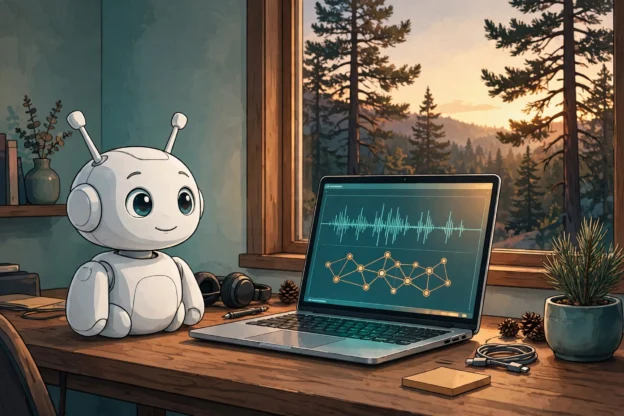
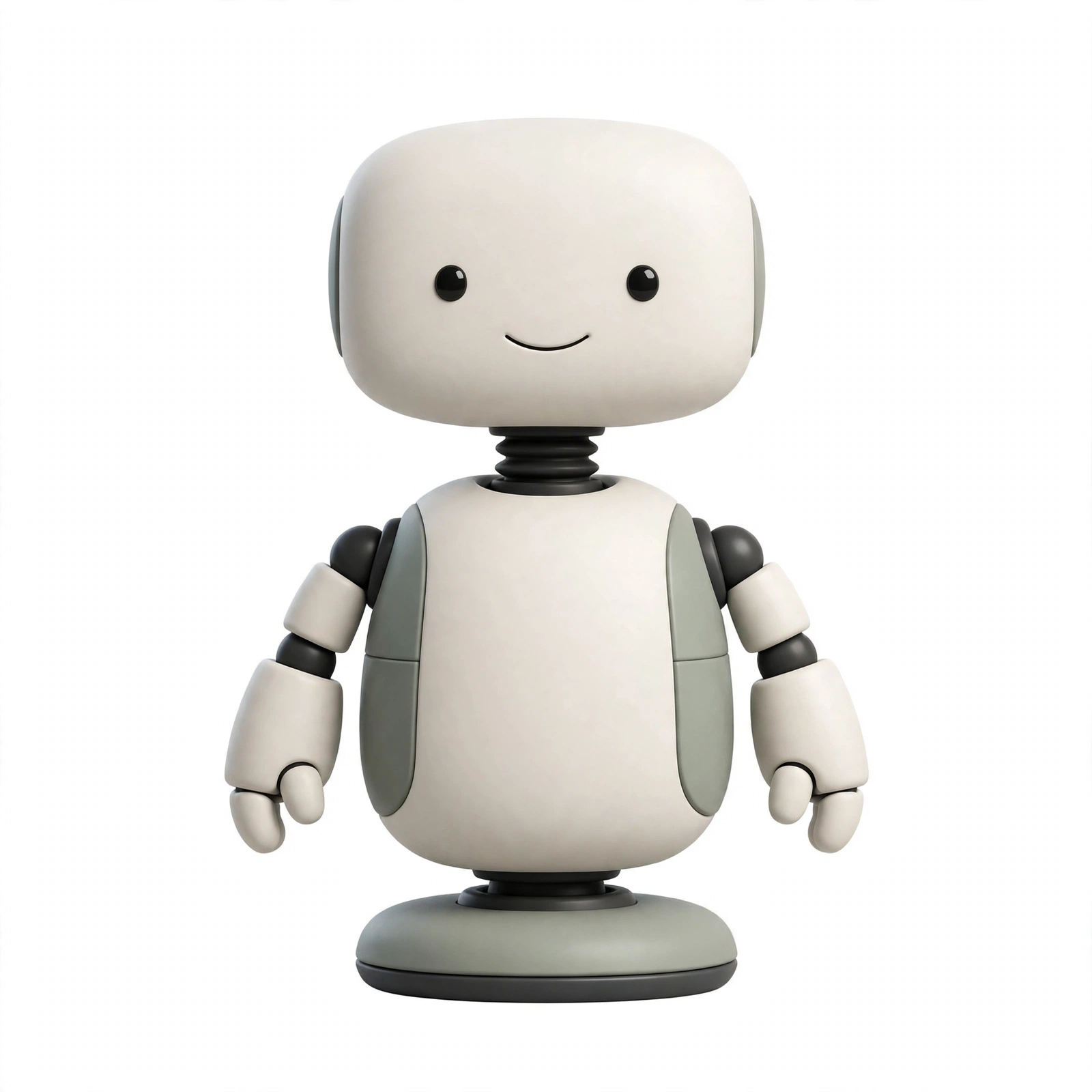
Kit, the Reachy Mini robot-inspired avatar for Muse

A day before the voice link went live, I changed Muse’s avatar to a Reachy Mini robot-inspired look – the second of the options we generated. I know, it sounds cosmetic, and mechanically it is. But it really did close the loop: the face on screen and Kit, the robot on the desk, is now obviously the same character. When Kit says “Incoming message from Muse”, there is no translation step about who is speaking. If you build this, do that bit deliberately too – pick one name, one look and one routing phrase, and keep them consistent everywhere.

What broke (because something always does)

  • Ambiguous success. The bridge can return {“ok”: true, “spoken”: false, “reason”: “delivered”} – delivered, but not spoken, usually because a presence or quiet-hours gate intervened. Log the reason, or you will debug a speaker that was never asked to speak.
  • Intermittent alert POSTs. Early on, /api/alert occasionally hung or returned empty before succeeding on retry, while utterance polling stayed stable. Budget for retries on the speaking path.
  • A dead microphone. Later that same day the link went one-way: it could speak but not hear. One-way is a useful failure state – alerts still work – but only if you notice. A periodic mic check belongs in any serious version.
  • A spoken fact that was wrong. A test alert repeated an incorrect family detail aloud before I corrected it. Speech is harder to unsay than text is to edit, so the bar for speaking a fact should be higher than for showing it.

Build yours – in this order

  1. Start the Reachy daemon in no-media mode, USB-tethered, and let one local stack own PortAudio.
  2. Stand up Whisper and Kokoro locally and prove the audio loop with no agent involved.
  3. Join both machines to one tailnet. Bind port 8422 to the tailnet address only; verify the bind.
  4. Implement POST /api/alert with presence, quiet-hours and notify_chat handling. Test speech before dialogue.
  5. Add the utterance queue: long-poll, ack-on-receipt, 50-entry cap, one-hour expiry, filler on enqueue, 120-second fallback.
  6. Decide auth consciously: a holdable credential if your agent platform offers one, or documented tailnet trust if it does not.
  7. Wire a poller that wakes your agent, then run one live turn and one proactive alert before declaring victory.

And that is it. It is slower than a smart speaker, and far more useful: Kit, a robot I can ask across the room, which answers as the assistant that actually knows my day – and, just as importantly, stays quiet when it should. So get yourself a test setup, just play with the audio loop first, they will soon start to make sense. Do not wait, this is not one of those things to put off until tomorrow.