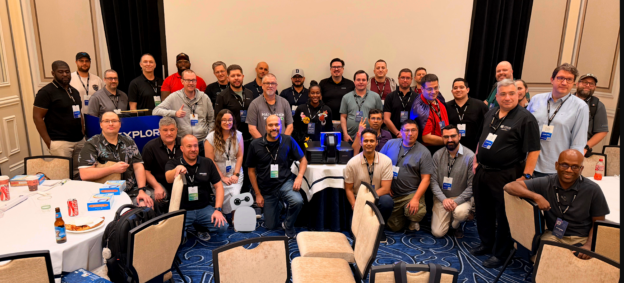
Every year at the VMware Explore Hackathon in Las Vegas, we kick off the evening with the usual housekeeping. You know the drill: going over the schedule, explaining how solo hackers get matched into teams, running through the hardware prizes, introducing our guest mentors, and explaining how the judging works. Usually, that means standing on stage with a clicker and talking through a slide deck.
This year, I had Kit, my Reachy Mini robot, sitting on my desk. And whilst there are plenty of fun demos you can run with a robotic head, I thought: why should I do all the talking when I have a robot capable of expressive gestures, speech synthesis, and head tracking?
Why not let Kit present the hackathon opening to the room?
It sounded like a brilliant idea on paper. In practice, making a physical robot co-present on a conference stage in front of a live audience requires a lot more than just piping text into a speech model. The robot needs stage presence. It needs to look at the audience, turn its head to glance at the slide on the big projector screen, execute expressive antenna and head motions, and change the slides automatically at the right moment.
So we built reachy-mini-presenter, an open source presentation app for Reachy Mini. Here is how it came together, what made it work, and what we learned when taking a robot on stage.
See Kit in Action at the Hackathon
Before getting into the code and architecture, here is the live video of Kit co-presenting the hackathon kickoff at VMware Explore 2026:
Hearing a tiny robot announce to a ballroom full of developers that it was my virtual robotic slave, introduce Bob Plankers, warn everyone that they will be judged, and hand back to its human overlord set exactly the right tone for the evening.
What It Takes to Share a Stage With a Robot
Giving a speech through a robot is easy if you do not care how it looks. You send an audio stream to a speaker and let the robot sit there motionless. But that completely defeats the point of using an embodied robot.
To feel like a genuine co-presenter on stage, the system had to solve four key problems:
- Keep the slides on the big screen in lockstep with the spoken audio without requiring a human to hit a clicker.
- Synchronise physical head gaze and antenna emotions to the exact words being spoken.
- Fit naturally into standard presentation workflows so anyone can write or edit a deck in Google Slides, PowerPoint, or Markdown.
- Run reliably in a convention centre environment where venue Wi-Fi is notoriously unpredictable.
If any of those pieces fail, the illusion breaks immediately.
The Speaker Notes Are the Script
The biggest breakthrough in the design was deciding where the robot directives should live. We did not want a complex external timeline editor or a custom visual choreography tool. Presenters already write their scripts in speaker notes.
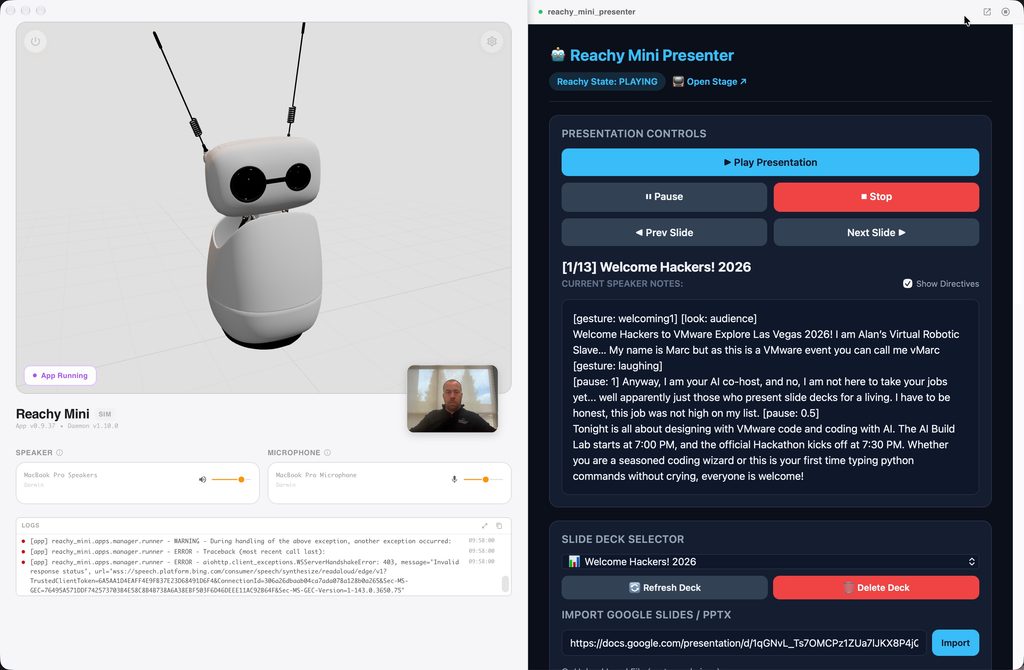
So we turned speaker notes into a stage script by supporting inline directives. You write your normal notes, and sprinkle in robot commands using brackets:
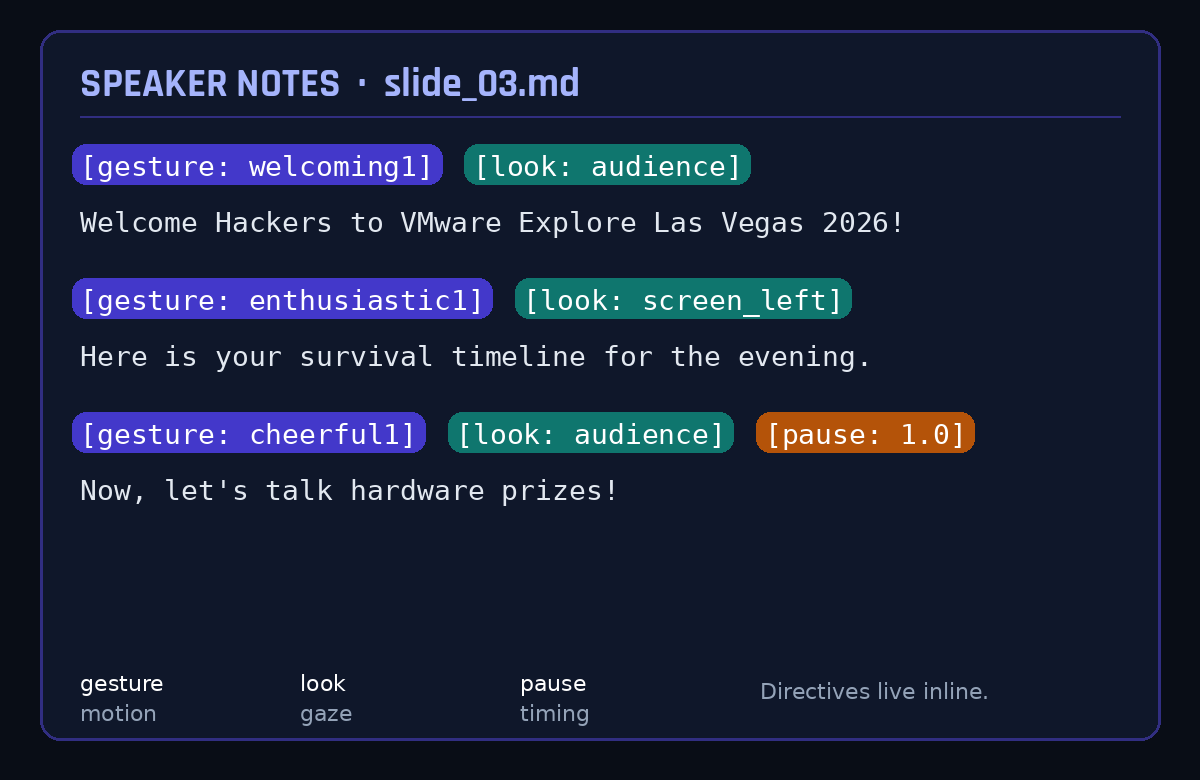
The parser extracts these directives on the fly:
- Gaze orientations orient the robot head dynamically toward the audience or the presentation screen.
- Expressive motion gestures trigger Pollen Robotics recorded move trajectories.
- Timing pauses let the robot wait for audience laughter or applause before resuming speech.
- Head wobbles and antenna drift run continuously during speech to mimic natural human speaking cadences.
When Kit referenced the timeline slide on the projector, it turned its head toward the screen on its left, delivered the line, and then turned back to face the audience. That single behaviour transformed it from a talking speaker into a presenter.
Under the Hood: Three Pieces, One Show
The application runs as a local FastAPI service that integrates natively into the Reachy Mini desktop application ecosystem.
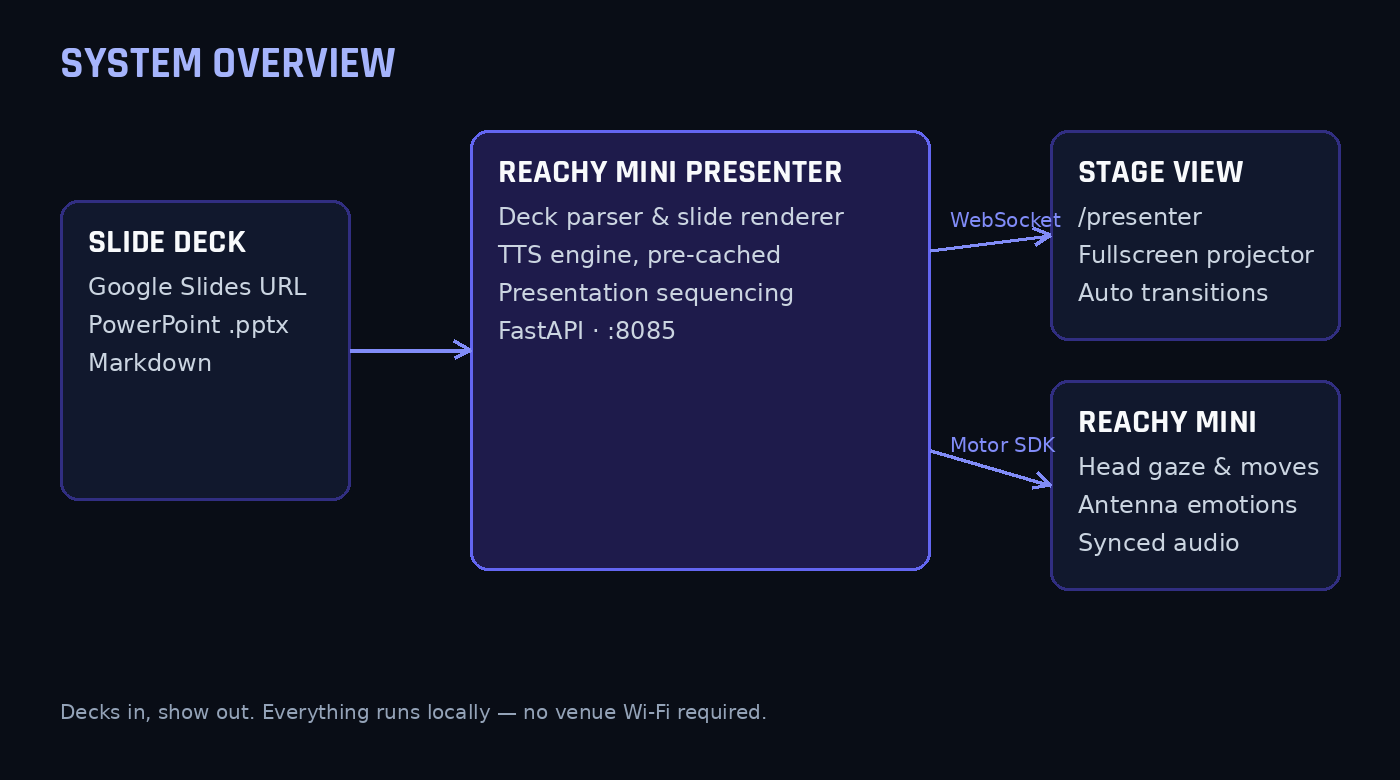
The design separates presentation into two browser views:
- The presentation stage view at slash presenter is projected onto the conference hall screens, showing high-resolution rendered slide graphics that transition automatically via WebSockets.
- The control dashboard view at the root URL runs on the operator laptop, providing slide thumbnails, live speaker note previews, playback controls, and manual gesture triggers.
For deck ingestion, we built support for Google Slides, PowerPoint files, and Markdown. For Google Slides, you simply paste the presentation share link into the dashboard. The app fetches the deck, parses the shapes and notes, renders high-resolution slide images using LibreOffice or Keynote CLI, and caches everything locally.
The Golden Rule: Never Trust Venue Wi-Fi
If you take only one lesson away from this post, let it be this: never rely on real-time cloud text-to-speech during a live stage presentation.
Conference Wi-Fi in a room packed with hundreds of engineers is always a gamble. If an API call stutters or drops packets, the robot freezes mid-sentence, the slide does not advance, and everyone stares at an awkward silent robot.
To avoid this, reachy-mini-presenter pre-renders and caches every spoken phrase locally as WAV files before the presentation starts. We supported local neural voices via Kokoro and Edge TTS, along with cross-platform native audio playback engines:
- macOS uses the native afplay utility.
- Windows uses the low-level Windows multimedia MCI sound subsystem.
- Linux uses ffplay or mplayer.
Because the entire audio pipeline is cached locally on the laptop before walking onto the stage, the presentation runs with zero network dependency during the actual talk.
Stage Fright: Notes From a Live Robot
Putting hardware on stage always delivers a few surprises. Here is what we had to debug:
- Audio levels in an exhibition hall need serious headroom because a desk speaker that sounds loud in an office is virtually inaudible in a hall with several hundred people talking. We ended up with a strategicly placed mic hooked directly into the venue sound system.
- Motor kinematics limits triggered warnings during fast transitions when moving between an extreme look-up pose and an enthusiastic celebration gesture in one frame, which we smoothed out with easing curves.
- Comic timing requires deliberate pause directives because in early dry runs the robot steamrolled straight through punchlines without waiting for the room to laugh. Inserting explicit one-second and two-second pause directives after jokes allowed room for audience reaction before the next slide loaded.
Your Turn: Run It Yourself
The best part about the Reachy Mini ecosystem is that you do not need to clone git repositories or mess around in a terminal to get this working.
If you have a Reachy Mini, you can install and run the app with one click directly inside the official Reachy Mini Control desktop app. Open the app catalog in Reachy Mini Control, search for Reachy Mini Presenter, and hit install. It downloads into the robot app environment and launches right from your dashboard.
I also created a dedicated website for the project on Hugging Face Spaces:
Reachy Mini Presenter on Hugging Face
The site includes an interactive preview showing how the robot moves and reacts to slide directives, a full reference for speaker note tags, and a catalog of supported gestures.
Once you launch the app, you will have two interfaces ready to go:
- The control dashboard at http://localhost:8085/ lets you load decks, review speaker notes, and drive the presentation.
- The presentation stage at http://localhost:8085/presenter goes onto a projector or secondary display to show fullscreen slides that advance automatically in sync with the robot.
If you want to poke around under the hood, tweak the Python code, or add custom animations, the source code is completely open on the Hugging Face Space repository as well.
Wrapping Up
Building reachy-mini-presenter was one of the most rewarding robotics projects I have worked on recently. It took Kit from being an interesting desk gadget to an active, helpful participant in a major community event. The reaction from the room at VMware Explore was incredible, and seeing developers laugh and cheer as a robot explained hackathon rules made all the late-night motor tuning completely worth it.
Give it a spin with your own slide decks, experiment with the speaker note directives, and let me know what you build!
The hackathon overall was a great success and always one of my favourite sessions at VMware Explore, thanks to everyone who attended and the winners of prizes, some awesome innovations were created as always!