
VMware ESX 3.5 Update 4 has been released, find the official download link here and the documentation here.
VMware Virtual User Group
I was contacted and asked if it was a good idea to start a VMware Virtual User Group, I think this is a great idea and it would compliment the already existing physical user groups and podcasts which exist.
To get an idea of the kind of format please visit Marco Shaw’s site and watch one of the Powershell User Groups.
To get a better idea of if this would be widely received and the kind of things people would like to see I thought I would start a quick survey.
So please take 2 minutes to fill out this single page survey and help pave the way for the virtual user group…
Click here to take our Online Survey
Who knows, if its a hit we may even get more members than the Dutch VMUG 🙂
VI Toolkit Presentation
 This week I gave a presentation to the UK PowerShell User Group at the Microsoft HQ in the UK, this was also available over live meeting and seemed to go quite well, despite the issues with the projectors, wifi, sound and rooms we were in.
For those people who couldn’t make the live meeting or the UK PowerShell User Group I have uploaded my slide deck for you to have a look through.
Download the slides here in PDF format… https://virtu-al.net/Downloads/VMwareVIToolkitPSUKUG27-03-09.pdf
My Presentation followed a nice insight into the 2008 Active Directory cmdlets that are being released by Microsoft, Jonathan Medd gave a great comparison of this and the Quest tools and also showed us a nice demo of the new Recycle bin feature in 2008 Active Directory.
These were both recorded and presented over Live Meeting, I will include a link so that you can watch them as soon as it is available.
Using the VI APIs from PowerShell
The trigger for this article was a question I got from Alan. He wanted to know how he could get, from within a PowerShell script, a report of all the tasks that were run against a specific virtual machine during the last seven days.
The VI Toolkit (VITK) has a Get-Task cmdlet, but that cmdlet is in the current release of the VITK a bit restricted in it’s use. See the community thread “Determine the “lineage” of a VM | From which Template was a given VM authored?” for a further discussion on this.
Since it became clear that the VITK wouldn’t give me what I wanted, the only possible alternative was to go to the VI APIs.
Every time I need to use the VI APIs I start by looking in the API Reference Documentation.
This document, which is in fact a web-based search tool, has a rather straight-forward layout. In the left pane you find the main menu and in the right pane you will find the details on everything you select in the left pane.

Where you start your search in the API Reference depends a bit on what you have to start with. Continue reading
VI Toolkit One-Liner: VM Guest Disk Sizes
A Simple One-liner today but it shows you how to add information along the pipe line to enable new properties which can be formed using other cmdlets or simple math statements on existing properties:
This one-liner will give you the VM disk or partition sizes for each of your VMs:
ForEach ($VM in Get-VM ){($VM.Extensiondata.Guest.Disk | Select @{N="Name";E={$VM.Name}},DiskPath, @{N="Capacity(MB)";E={[math]::Round($_.Capacity/ 1MB)}}, @{N="Free Space(MB)";E={[math]::Round($_.FreeSpace / 1MB)}}, @{N="Free Space %";E={[math]::Round(((100* ($_.FreeSpace))/ ($_.Capacity)),0)}})}
VI Toolkit One Liner: Correct HAL ?
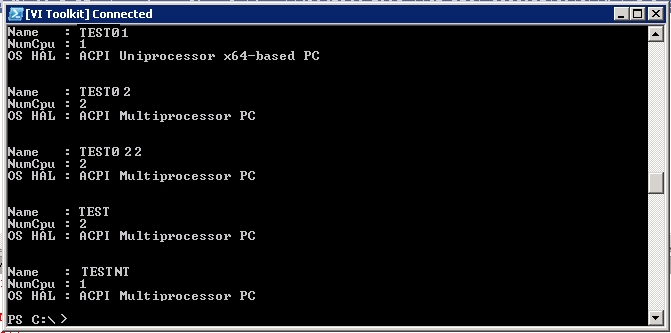
I have just re-worked an old script which I created to check each VM to ensure they are using the correct HAL based on the amount of processors they have installed, as it turns out I managed to get this into a nice one-liner:
Get-VM | Where {$_.PowerState -eq "PoweredOn"} |
Sort Name |
Select Name, NumCPU, @{N="OS HAL";E={(Get-WmiObject -ComputerName $_.Name -Query
"SELECT * FROM Win32_PnPEntity where ClassGuid = '{4D36E966-E325-11CE-BFC1-08002BE10318}'" |
Select Name).Name}}
Or to break it down so it fits on my blog…
Get-VM | Where {$_.PowerState -eq "PoweredOn"} | Sort Name | Select Name, NumCPU, @{N="OS HAL";E={(Get-WmiObject -ComputerName $_.Name -Query "SELECT * FROM Win32_PnPEntity where ClassGuid = '{4D36E966-E325-11CE-BFC1-08002BE10318}'" | Select Name).Name}}
Output:
VI Toolkit One Liner: Who’s busy ?
Most of my work with the VI Toolkit has been scripts so far, well the work that I have added to this blog anyway, I use one-liner’s on a daily basis to make my job easier.
It was suggested to me that I should add some one-liners to my blog as I’m going to be busy over the next couple of weeks so I had a quick tinker.
This one-liner is quite a simple but long one-liner just to get started:
View the top 10 VM’s which have been using memory for the last 48 Hours:
Get-Stat -Entity (Get-VM | Where {$_.PowerState -eq "PoweredOn"}) -Start ((Get-Date).AddHours(-48)) -Finish (Get-Date) -Stat mem.usage.average | Sort-Object Value -Descending | Select-Object Entity, Value -First 10
PowerGUI VMware PowerPack 2.1.5 released
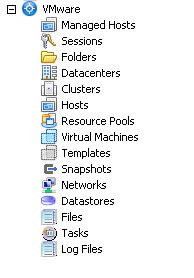
Scott and Kirk have done it again, they are really kicking out the updates to this powerpack recently and this one adds some great features:
1. As you can see by the image, they have greatly improved the icons making a great visual experience.
2. You may notice a new Action on the menu… Generate vDiagram

Yes that’s right, Kirk has taken my Visio script, torn it up, threw it out and come up with something completely amazing.
Virtu-Al goes mobile

I have now optimised my site for mobile viewing, if you use a mobile browser this blog should now be much easier to read.
All your favourite VI Toolkit goodness in the palm of your hand 🙂
Any issues please let me know !
VI Toolkit Lab @ VMWorld
Whilst at VMWorld I managed to sit in on the very popular VI toolkit Lab, this was one of around 10 labs which were running during the day and people could go up and run through some testing on a pre-built lab environment all for themselves.
This gives people a great opportunity to play and mess with things that they may not get a chance to do in there normal line of work.