Why EMC for VMware

Recently at the London VMware User Group I gave an additional presentation on top of the normal PowerCLI session I normally provide (which was interactive this time and I think worked very well).

The subject of this session was “Why EMC for VMware”, I have had a number of questions from people who know that I have joined EMC and I wanted to address these and show exactly what EMC is doing when it comes to VMware, one thing I didn’t know about EMC before joining them was how tight they actually integrate both their software and hardware product ranges into VMware and vCenter, making both the life of the virtual admin and the storage admin (I know most of us are now both) 100 times better.

During the presentation Simon Seagrave (fellow vSpecialist and blogger) and I gave an overview of some of the EMC products and how they can make your life easier, just one good example of this is using the EMC Plugins for vCenter – strangely out of 2/3 of the room who said they were EMC customers only a few had tried these.

Using these plugins can make both the VMware admin and Storage admin start communicating together and understanding each others language – think of the universal communicator they use in StarTrek, now when the storage admin is talking to the VMware admin about LUNs and RAID levels, what used to be a glazed look will instantly be translated into datastores and performance !

Check out the below slides or Chad’s great post explaining the plugins in detail which can be found here.
Continue reading →

London VMUG – Thu 15 July – Lets get interactive !

I have been given my normal resident slot at the London VMUG this Thursday, 15th July.

At the last VMUG I showed how vEcoShell could be used to add the graphical interface back onto our PowerCLI scripts and also gave an overview of the “VMware Community PowerPack”, when performing the demo I showed how easy it was to drill down into an object using the debugger in the script editor.

Someone asked me if next time I would give more tips and tricks like this, the kind of tips you pick up without realising it and are really helpful to people starting to learn PowerCLI.

So this time there will be a change in the way my session is presented…. We are going to get interactive !

If you are attending my PowerCLI session at the VMUG this Thursday 11-12, please bring along the following equipment:

I will bring these on a USB stick also but it will help if you are already setup and raring to go !

My plan is to host a ESX host and a vCenter VM and a few other VMs which we can all hook into and mess with, we can all do the same things and learn at the same time, I will have some mini instructions to follow which will help you along the path – think of this as a free PowerCLI course !

We will start off slow and then I will ask you to do a few things on your own, just to keep you awake.

Hopefully it will go down without a hitch, if you are unable to bring your laptop don’t worry I will try and put you in a group with other people so we can all observe and work together.

See you on Thursday and please remember your laptop !

Speed up PowerCLI

Whilst at the last UK VMware User Group I was talking to someone who advised his PowerCLI prompt took a long time to initialise, he had the latest version (4.0 U1) and the latest version of PowerShell (V2), this is a problem I had seen before and especially when your computer is not attached to the internet and you start PowerCLI.

Symptom: The PowerShell prompt starts straight away but PowerCLI does not, if you start PowerShell normally and then add the PowerCLI snap-in it takes a good minute or so before returning back to the prompt and being ready for action.

Fix:  I had come across this before on the PowerCLI forum where someone had this exact issue and had advised us how to fix it, I thought I would blog it here, especially for him but also for the other people reading this blog and suffering with the slow start-up of PowerCLI.


Continue reading →

Goodbye Virtu-Al – Hello Community

This may not be news to some of you as I have mentioned it at both the Dutch VMUG and the London VMUG but anyway, if you were not lucky enough to make it to these because you live in a far away place then please read on…

The Virtu-Al PowerPack is no more – gone, dead and buried – RIP

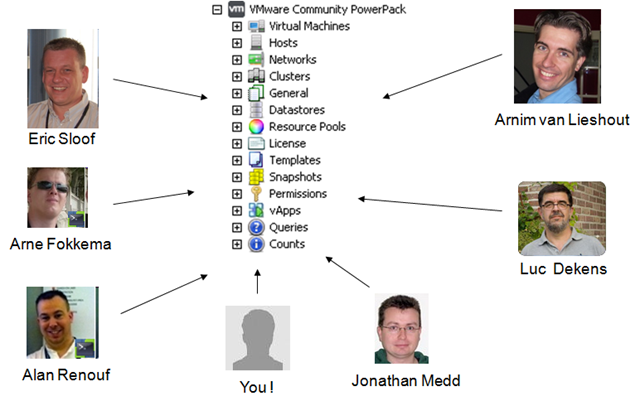
However, the “VMware Community PowerPack” has arrived ! Yes it is a rename but also there is new content and a whole lot more to come, to give this the justice it needs I have created a landing page for the PowerPack at the top of my site under featured scripts or click here.

On the landing page you can see how to download it, a video showing how to install it and also how you can get involved in making it even more useful – Come on people we are all managing the same VMware software here !

Don’t worry if you don’t have scripting skills, you can still get involved !

And with great people like the below already adding content it is destine for great things !

image

Head over to the landing page https://virtu-al.net/featured-scripts/vmware-powerpack/ and check out the “VMware Community PowerPack” now !

VMWorld: PowerCLI is for administrators !

The voting is nearly over for this years VMworld Sessions but I thought I would let you know that Luc Dekens (Lucd.info) and I have a session which you can help become a reality just by spending a few moments clicking on a button, if you have ever used a script by Luc and I and wondered how you could pay us back for the time we have spent (Cheques/cash/beer tokens are very welcome) then please hit the button now and come say Hi if you are at VMworld too !

A brief summary of the session

In larger organisations administrating a vSphere environment can cause headaches.

Some of the burning questions you surely recognize

  • Who gave that VM 4 CPU’s ?
  • Who connected the NIC to the DMZ PortGroup and when ?

In this session, Luc Dekens and Alan Renouf will show you how to automate the answers to these questions with the help of PowerCLI.  The solutions presented will show you how the combined strengths of the rich PowerShell command set and the PowerCLI snapin provide you with powerful tools to make this all happen.

Alan and Luc will show you how to take PowerCLI beyond the listing and reporting stage. They will show you how to write and use scripts that will inform you when problems actually.

This session will show several aspects of working with PowerCLI. The classic PowerCLI approach but also the use of the SDK methods when execution speed is required and the use of third party products like PowerGUI, PowerWF or Microsoft System Center Operations Manager (SCOM) to integrate the solutions even better into the corporate environment.

Luc and Alan will show several practical demos to highlight this integration. One of the demos will show for example how easy it is to use Active Directory to find a users email address and send him a message to tell him that his guest is using too many snapshots. If the mail stays unread, the script can try to reach the user via a Tweet.

Continue reading →

Why vEcoShell or PowerGUI makes sense

A little while back I started a PowerPack which could be used in either PowerGUI or vEcoShell – the application formerly known as “The Virtualisation EcoShell or VESI, my PowerPack was a collection of the most used scripts from my site all laid out in a nice GUI format.

Now why would you put a GUI back on top of the scripting, lets think about this…

Continue reading →

You can be at EMC World

Yes I am lucky enough to be attending EMC World for the first time from this Monday until Thursday but what about those people who are not able to afford the trip, well don’t worry, you can still enjoy the buzz and excitement of EMC World.  How ?

Live broadcasting will be in place so everyone will be able to share the announcements and the fun no matter what the location !

The current schedule of events shows key speakers such as Chad Sakac, Steve Herrord, Chris Carrier and more !

The broadcast will be LIVE from 2:30pm-5:30pm Eastern Time (GMT – 4.00) on Monday, Tuesday and Wednesday and can be seen on http://siliconANGLE.com/emcworld2010.

Make sure you check out the site above and join in the fun and also check the following blog for more information and updates: http://blogstu.wordpress.com/2010/05/06/emc-world-live/

We’re writing a book

PowerCLI Some of you might be interested to know, Alan and Luc are writing a PowerCLI book.

We don’t have many more details at the moment but wanted to let you know, as we are both very excited (and nervous by the amount of work) about this project.

As you know we both live and breathe PowerCLI. And we want to share our knowledge to help others achieve the level of PowerCLI automation we both know is possible.

One thing you can expect from this book is a practical approach with examples galore, we aim to cover most of the common configuration/troubleshooting and reporting areas with easy to understand examples and explanations.

To answer some of your questions:

Q: What’s the title ?
A: Well, in the end we went for “VMware vSphere PowerCLI Reference: Automating vSphere Administration”

Q: Why ?
A: We’re both crazy enough to think we can do this.

Q: When ?
A: Our publisher, Sybex, targets 2011 Q1

Q: What ?
A: Expect a practical, down-to-earth approach. We’re going to show you how you can manage all aspects of your vSphere environment with PowerCLI.

Q: Who are these guys ?
A: Alan, who recently joined EMC’s vSpecialist army, is well-known from his Virtu-Al blog, his UK VMUG appearances, as a co-host of the Get-Scripting podcasts and as the winner of the recent Script-O-Mania contest.
Luc, aka LucD, is known from the PowerCLI Community, his LucD notes blog, his Dutch VMUG and VMworld appearances and as the winner of the first PowerCLI Scripting contest.

Q: Where do these guys live ?
A: Alan, contrary to some rumours, is an English guy and lives in Wiltshire, UK.
Luc lives in Belgium and works in the Netherlands. The best of both worlds 😉

Incorrectly named VMs

I was recently contacted via my blog and asked if there was a way to find the VMs which are not named in vCenter the same as they are in Active Directory or their hostname, the person contacting me had explained that someone had “accidently” renamed a number of VMs and when there was an issue with the windows VM they were unable to find it as the name of the VM did not relate to the hostname in any way.

The quick way to find the VM was easy enough, we can easily find the VM with this single one-liner:

Get-VM | Where { $_.Guest.HostName -match "HostnameOfVM"} | Select Name, @{N="Hostname";E={$_.Guest.Hostname}}

If you replace “HostnameOfVM” in the above example with the hostname you should get the correct results back showing the name and the Hostname of the VM.

With this in mind I expanded the above one-liner a little to check your vCenter for each VM which may have a VM name which is different to the hostname, now obviously this depends on if you name the VMs with the hostname or the FQDN so I added an option for both.

If you name your VM’s with the FQDN like MyVM.MyDomain.Com rather than just the hostname (MyVM) then simply set the $IncludeFQDN to $true rather than the preset $false.

As it stands at the moment, the below script will tell you about the VMs which are not named correctly and it will also tell you that it would have changed the name, that’s because this script is currently in “Whatif” mode, this mode means it will tell you if it was going to make a change and not actually make the change.  I would run the script as it was and if you are happy with the results simply remove the –whatif which is located after the Set-VM cmdlet, this will then enable the cmdlet to set the name of the VM back to the correct name.

Connect-VIServer MyvCenterSRV
# Specify if your virtual machine names include the FQDN
$IncludeFQDN = $false

Get-VM | Where { $_.PowerState -eq "PoweredOn" } | Foreach {
    If ($IncludeFQDN) {
		$Name = $_.Guest.Hostname
	} Else {
		$Name = (([string]$_.Guest.HostName).Split("."))[0]
	}
    If ($_.Name -ne $Name) {
        If ($_.Guest.Hostname) {
            Write "VM name '$($_.Name)' is not the same as the hostname $Name"
			Set-VM $_.Name -Name $Name -whatif
        } Else {
            Write "Unable to read hostname for $($_.Name) - No VMTools ?"
        }
    } 
}

A gentle reminder that whilst this may rename the VM name correctly it will obviously not touch the name of the folder on the datastore, if the name was not correct in the first place then your folder name will be incorrect which is an entirely different issue (picked up by my vCheck script), this can of course be resolved whilst the VM is powered on by performing a storage vmotion to another datastore, a SVMotion renames the folder and files to the correctly named entities.

Virtu-Al + EMC = Automated vBlocks ?!

EMC Well im not sure about the PowerCLI automated vBlocks as yet but I did want to let my readers know that I (like many others) have now joined EMC working as a vSpecialist in EMEA.

I know this blog is mainly about PowerCLI and I have had a fir few questions about if I will still be blogging and if I will still be using PowerCLI, I wanted to answer these questions… YES !

EMC are a very forward thinking company, you should know that by now, look at there continued delivery of leading products and software, with this being the case they actively encourage blogging and therefore my blog will definitely still be here for a long time yet.

PowerCLI has been my bread and butter for a long time now, its what most people know me for, apart from not being French.  This blog will still include many PowerCLI examples, experiences and updates to my current projects.  Believe me, I have a long list of scripts to write which I have thought of over a log period of time.

I am super excited to be a part of what EMC is doing with the vSpecialist team and hope to update you on more PowerCLI / VMware and EMC articles soon.  I want to make it clear though, any opinions or expressions on my site will by mine alone and not that of EMC, hence the new disclaimer on the right hand side of the site !

Lastly, sorry for the self-publicised article…. normal service will be resumed as soon as possible.