
Category Archives: VMware

VI Toolkit Presentation

imageThis week I gave a presentation to the UK PowerShell User Group at the Microsoft HQ in the UK, this was also available over live meeting and seemed to go quite well, despite the issues with the projectors, wifi, sound and rooms we were in.

For those people who couldn’t make the live meeting or the UK PowerShell User Group I have uploaded my slide deck for you to have a look through.

Download the slides here in PDF format… https://virtu-al.net/Downloads/VMwareVIToolkitPSUKUG27-03-09.pdf

My Presentation followed a nice insight into the 2008 Active Directory cmdlets that are being released by Microsoft, Jonathan Medd gave a great comparison of this and the Quest tools and also showed us a nice demo of the new Recycle bin feature in 2008 Active Directory.


These were both recorded and presented over Live Meeting, I will include a link so that you can watch them as soon as it is available.
VI Toolkit One-Liner: VM Guest Disk Sizes

A Simple One-liner today but it shows you how to add information along the pipe line to enable new properties which can be formed using other cmdlets or simple math statements on existing properties:

This one-liner will give you the VM disk or partition sizes for each of your VMs:

ForEach ($VM in Get-VM ){($VM.Extensiondata.Guest.Disk | Select @{N="Name";E={$VM.Name}},DiskPath, @{N="Capacity(MB)";E={[math]::Round($_.Capacity/ 1MB)}}, @{N="Free Space(MB)";E={[math]::Round($_.FreeSpace / 1MB)}}, @{N="Free Space %";E={[math]::Round(((100* ($_.FreeSpace))/ ($_.Capacity)),0)}})}

Continue reading →

VI Toolkit One Liner: Correct HAL ?

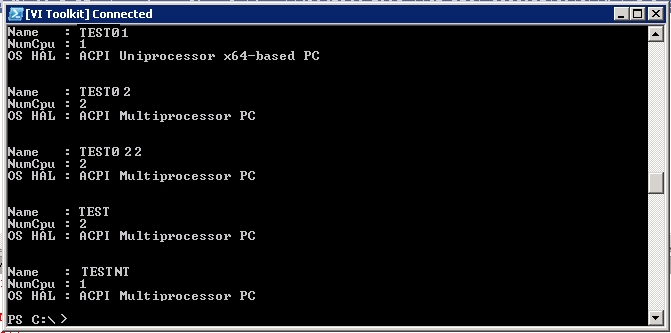
I have just re-worked an old script which I created to check each VM to ensure they are using the correct HAL based on the amount of processors they have installed, as it turns out I managed to get this into a nice one-liner:

Get-VM | Where {$_.PowerState -eq "PoweredOn"} | Sort Name | Select Name, NumCPU, @{N="OS HAL";E={(Get-WmiObject -ComputerName $_.Name -Query "SELECT * FROM Win32_PnPEntity where ClassGuid = '{4D36E966-E325-11CE-BFC1-08002BE10318}'" | Select Name).Name}}

Or to break it down so it fits on my blog…

Get-VM | Where {$_.PowerState -eq "PoweredOn"} |
Sort Name |
Select Name, NumCPU, @{N="OS HAL";E={(Get-WmiObject -ComputerName $_.Name -Query 
"SELECT * FROM Win32_PnPEntity where ClassGuid = '{4D36E966-E325-11CE-BFC1-08002BE10318}'" |
Select Name).Name}}

Output:

hal

VI Toolkit One Liner: Who’s busy ?

Most of my work with the VI Toolkit has been scripts so far, well the work that I  have added to this blog anyway, I use one-liner’s on a daily basis to make my job easier.

It was suggested to me that I should add some one-liners to my blog as I’m going to be busy over the next couple of weeks so I had a quick tinker.

This one-liner is quite a simple but long one-liner just to get started:

View the top 10 VM’s which have been using memory for the last 48 Hours:

Get-Stat -Entity (Get-VM | Where {$_.PowerState -eq "PoweredOn"}) -Start ((Get-Date).AddHours(-48)) -Finish (Get-Date) -Stat mem.usage.average | Sort-Object Value -Descending | Select-Object Entity, Value -First 10

Continue reading →

PowerGUI VMware PowerPack 2.1.5 released

image

Scott and Kirk have done it again, they are really kicking out the updates to this powerpack recently and this one adds some great features:

1. As you can see by the image, they have greatly improved the icons making a great visual experience.

2. You may notice a new Action on the menu… Generate vDiagram

image 

Yes that’s right, Kirk has taken my Visio script, torn it up, threw it out and come up with something completely amazing.

Continue reading →

VI Toolkit Lab @ VMWorld

Whilst at VMWorld I managed to sit in on the very popular VI toolkit Lab, this was one of around 10 labs which were running during the day and people could go up and run through some testing on a pre-built lab environment all for themselves.

This gives people a great opportunity to play and mess with things that they may not get a chance to do in there normal line of work.

Continue reading →

UK VM User Group – London

Don’t forget that next Tuesday (10th March 2009) will be the next UK London VMware User Group . This meeting will be sponsored by Veeam Software.

The meeting will be held at the following location:

The Thames Suite,
London Chamber of Commerce and Industry,
33 Queen Street,
London EC4R 1AP,

+44 (0)20 7248 4444.

The nearest tube station is Mansion House, location information is available here.

Continue reading →

Setting MMU for your VMs

I was asked by my friend Duncan if it was easy enough to set the Memory Management Unit (MMU) for each of his VM’s.  Read his post here for more information on what he was working on.

He was about to set this by hand for 50+ VM’s which would take a while, so with the power of the VI Toolkit he can now take it easy whilst PowerShell does the hard work:

For one VM:
Get-VM -Name "MyVM" | Get-View | foreach {
    $spec = New-Object VMware.Vim.VirtualMachineConfigSpec
    $spec.flags = New-Object VMware.Vim.VirtualMachineFlagInfo
    $spec.flags.VirtualMMuUsage = "on"
    $taskMoRef = $_.ReconfigVM_Task($spec)
}
For all VMs you could use:
Get-VM | Get-View | foreach {
    $spec = New-Object VMware.Vim.VirtualMachineConfigSpec
    $spec.flags = New-Object VMware.Vim.VirtualMachineFlagInfo
    $spec.flags.VirtualMMuUsage = "on"
    $taskMoRef = $_.ReconfigVM_Task($spec)
}
Or for each of the VMs in a cluster:
Get-Cluster "MyCluster" | Get-VM | Get-View | foreach {
    $spec = New-Object VMware.Vim.VirtualMachineConfigSpec
    $spec.flags = New-Object VMware.Vim.VirtualMachineFlagInfo
    $spec.flags.VirtualMMuUsage = "on"
    $taskMoRef = $_.ReconfigVM_Task($spec)
}

To list each of the VM’s and their current MMU setting use this one-liner:

Get-VM | Get-View | ForEach {Write "$($_.Name) - $($_.Config.Flags.VirtualMmuUsage)"}

VMTN: Ask The Experts – How did it Go ?

VMTN - Ask the Experts

I wanted to say thanks to everyone that came to see us at VMWorld Europe 2009 in Cannes, and especially the people who asked me some questions.

After a slow start to the first day it picked up and we had a fair few visits from people the second day.  I especially want to thank the German guy who came well prepared, he had a sheet of A4 paper full of questions for me. I think I managed to answer most of them.


I had some interesting questions from some other people who I have promised to write a few scripts for, I will post these on my blog, hopefully over the next couple of weeks.

Continue reading →

The VESI is on its way

Whilst at VMworld Europe 2009 I managed to get a sneak preview of the VESI, if you are unsure what this is then please check my previous post here.   Judging by the interest of the Vizioncore stand and the fact that Scott Herold was looking rather tired at the end of each day I am sure this product is going to AMAZING.

I managed to capture a few sneaky pics of the vDiagram portion of the app and let me tell you, if you liked my original script then you are in for a treat when they release this app, as you can see below they have added more features, nicer shapes and a whole can of kick ass in the process.

Continue reading →