Category Archives: PowerShell

The VESI is on its way

Whilst at VMworld Europe 2009 I managed to get a sneak preview of the VESI, if you are unsure what this is then please check my previous post here.   Judging by the interest of the Vizioncore stand and the fact that Scott Herold was looking rather tired at the end of each day I am sure this product is going to AMAZING.

I managed to capture a few sneaky pics of the vDiagram portion of the app and let me tell you, if you liked my original script then you are in for a treat when they release this app, as you can see below they have added more features, nicer shapes and a whole can of kick ass in the process.

Continue reading →

VI Toolkit voted Number 1

In a recent VMTN Round table podcast we were asked what our predictions would be for 2009, mine was “Automation of VMware Products”,  after visiting VMWorld Europe 2009 in Cannes it would seam that my prediction was coming true.

Whilst there I attended ‘TA01 – Managing VMware With PowerShell’ presented by Carter Shanklin (VI Toolkit Product Manager), one of the developer of the VI toolkit and also Dennis Zimmer (CTO of Icomasoft).

Continue reading →

VI Toolkit Quick Reference Guide


VI Toolkit Quick Reference Guide

VI Toolkit Quick Reference Guide

I’m currently sat in Heathrow Airport Terminal 1, I have just found a nice Zurich stand where they give you place to sit, a plug for the laptop and even an Ethernet cable with free Internet access, how nice is that !

So I thought I would best use my time to upload a Quick Reference guide to the VI Toolkit, hopefully I will be handing a few of these out at VMWorld but thought I would also add it to my blog for those of you who were unable to make it.

If you are interested in getting started with the VI Toolkit then print off the attached pdf file on a duplex printer, fold it in half and you have the ultimate getting started guide.

Thanks to C.Shanklin, S.Herold, L.Dekens and C.Bunch for their help with the editing and for the one-liners.

Have Fun !

More Network Info

Following my previous network information script I was asked to add the VSwitch, so here it is…

The following script will add some nice host network information into an object which is exported to a csv file for passing to the network guys or can be used to find your server in that mess of cables that are always meaning to be tidied in the data center.

Continue reading →

PowerGUI – Get started the easy way

Are you using PowerGUI and the VMware Powerpack yet, if the answer is no then why not ?
If you think its something that you will have to learn and you just dont have the time then please stop making excuses right now because VMGuru has just released some great new videos that not only show you how to get started but will also convert you into a guru.
The following videos are available from VMGuru’s site here

1. Establishing Connections to your VMware Infrastructure using the PowerGUI Console
2. Navigate your VMware Infrastructure using the PowerGUI Console
3. Execute Links and Actions in the PowerGUI Console
4. Create and Save Filters using the PowerGUI Console
5. Using the PowerGUI Script Editor

VMware Infrastructure PowerPack 2.1 for PowerGUI

Do you want to get some of the benefits of the VI Toolkit without the learning curve (even though its very easy to pickup)?

Well Kirk (Poshoholic) Munro has just updated the VMware Infrastructure PowerPack.  This is a great GUI way to access the power of the VI Toolkit and the skills of a Powershell Expert rolled into one smooth, easy to use application.

The VMware Infrastructure Management PowerPack for PowerGUI has just been updated to version 2.1 adding lots of new features and improving the already brilliant features.  This PowerPack facilitates management and automation of VMware Infrastructure servers using the VMware VI Toolkit with PowerGUI’s expandable administrative console.

Version 2.1 of the VMware Infrastructure Management PowerPack includes the following highlights:

  • Significant performance improvements when loading datacenters and clusters.
  • New top-level container nodes to facilitate viewing objects without having to browse into the Managed Hosts node.
  • Links allowing you to browse into log files from hosts.
  • Support for the VMware VI Toolkit 1.5 release.
  • VMotion support for virtual machines.

In addition to these changes, several links have been added and quite a few defects have been fixed.

You can learn more about this PowerPack, including version history and other details here. Great job Kirk and team.

Provison ESX Hosts through Powershell

The VI Toolkit community has been getting busier and busier of late, I think even LucD is taking 5 minutes to respond rather than his normal 2 minute answers!

There is one area of the VI Toolkit communities that I feel does not get enough publicity, there have been many scripts written by the community and members of VMware that are stored in the documents area of the community.

I will make it my aim to try and bring some of these fantastic scripts out into the open as the scripts and the people who wrote these scripts have done some amazing coding to help everyone else.

For example: NAEPS (Not Another ESX Provisioning Script) by SCampbell
Continue reading →

vDiagram – VMGuru Style

Scott Herold (VMGuru) has done it again, he has a habit of taking my scripts and then improving them beyond reality.

I think next time I will be asking him to check it out before I release it on the public.

Firstly he has amended the VMware Twits script and created a really neat PowerGui action which you can import into the VMware PowerGui Power Pack and allows you an easy way to keep up to date with all the VMware related twitters, Check it out here

addvirtutwitter2

As if that wasn’t enough he has now made some AMAZING improvements to the vDiagram script showing off his new shapes and also advising of new plans for it within PowerGui, how amazing would that be to be able to right click on a cluster and say ‘vDiagram it’ or to be able to right click a PortGroup and draw all VM’s attached to it and its relations with vSwitches.

The new shapes are absolutely gorgeous, make sure you check out the VMGuru site to keep updated on some of the great things he has planned with the VI Toolkit and general VMware related updates.

Check his article out here

Thanks Scott (And no I am not French :))

vmguru_lab

vDiagram – Draw your VI with one script

Every good blog post should have some real life story to help you visualise why things happen so here goes:

The Story
One day whilst sat in the office updating the disaster recovery documentation I needed to document the Virtual Infrastructure, we all know that managers like pretty pictures so the first thing they asked for was a pretty diagram of how the infrastructure looked.
After dropping my 40th VM object on the page I started to get a bit bored, i looked at other options.  There is already a great tool on the market that performs this job, Veeam Reporter produces multiple documents and does a great job, but being a contractor I have a nil budget.  Knowing that you can do some very cool things with Powershell I wondered how easy it would be to hook into the Visio com object to get powershell to create the document for me.
As it turns out it wasn’t that hard, there were a few sticky moments where I had to refer to the Visio forums, and a great starting point by the only powershell reference using Visio I could find (Check out CommandBreak_ Thanks Joeseph) after explaining what powershell was to the guys in the Visio Forum and explaining why I was using powershell as I think this is the first time these people had heard of it, I started to relate some of there c# examples back into powershell.
The Result
The result is by no means a totally polished all singing all dancing documenter that documents your VI from the left, from the right and upside down but what it is, is an example of what you can do with the Visio COM objects and powershell combined.
I have not yet included all the options I would like, in future versions I would like to be able to document the networking setup / storage paths etc but I’m working on something else so wanted to get this script out into the public.
Instructions
You will need:
  • Powershell V1 (I haven’t tried it on V2 yet)
  • The VI Toolkit
  • Microsoft Visio (I have only tried 2003 +)
How to use:
  1. Download the zip file from the bottom of this page
  2. Once extracted copy the  ‘My-VI-Shapes.vss‘ file to your ‘My Documents\My Shapes’ folder.  If the folder does not exist create it and copy the file in.
  3. Run the powershell script with the following options:
To diagram the entire Infrastructure:
vDiagram.ps1 –VIServer MYVISERVER

To diagram a specific cluster use the following:
vDiagram.ps1 –VIServer MYVISERVER -Cluster “Production Cluster’

Example Output
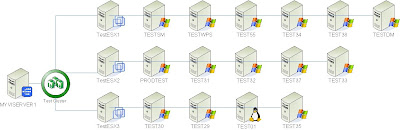


The Download

This project has now moved to Github so please do add any changes you have back to the project for everyone to take advantage of here: https://github.com/alanrenouf/VisioPowerShell