Author Archives: Alan

About Alan

Alan Renouf has a role of Automation Frameworks Product Manager at VMware responsible for providing the architects and operators of the cloud infrastructure with the toolkits/frameworks and command-line interfaces they require to build a fully automated software-defined datacenter. Alan is a frequent blogger at http://blogs.vmware.com/vipowershell and has a personal blog at https://virtu-al.net. You can follow Alan on twitter as @alanrenouf.

Unofficial Online VMware User Group #2

Following the success of the first UOVMUG the second will be held on 29th June at 08:00 PM BST / 03:00 PM EDT, hopefully it will be more interactive as we should be running it through webex, make sure you have visited the webex site before the meeting so that everything is installed and working fine.

The Agenda at the moment is as follows:

  • Introduction
  • Presentation and Demonstration of vWire
  • vCoffeebreak
  • Presentation and Demonstration of Powerpath for ESX – by Mitch Berke, EMC Sr. VMware Specialist
  • Finish and details of next Unofficial Online VMUG

Vote for Freedom vote for me (please)

My only chance of getting to VMworld this year is to win a all expenses paid trip, luckly enough Veeam have launched a competition which I have entered and first prize is a all expenses trip to San Francisco -VMworld 2009.

I always add my scripts to this blog for free and now Im hoping you may be able to help me out by simply voting for me at the following location:  Thanks in advance !

You will need to register to login but registration is only a 2 minute job.

Vote Here !

Come on, we can’t let the woman in a bra beat me (No not you Gabe the other one)!

vSphere permissions: export & import – Part 1

Short security principles intro

One aspect of your vSphere environment that shouldn’t be ignored is the built-in security feature that allows you to control who can do what with which vSphere entity.

Internally this is controlled from the AuthorizationManager. This object contains all the properties and methods you need to configure and manage the built-in security system.

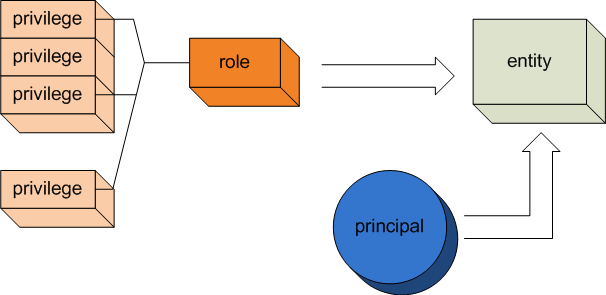
The principle how vSphere entities are protected is quite straightforward.

image

At the basis are the so-called privileges. Each privilege describes a basic action that can be performed on one or more of the vSphere entities.

Continue reading →

vSphere permissions: export & import – Part 2

In Part1 of this article we had all the roles and permissions exported to an XML file. It’s now time to import the roles and permissions into a Virtual Center.

The script does in fact the reverse of what the script in Part 1 did.

But there were a few “gotchas“ that had to be solved before arriving at a working solution.

Duplicate Names

The script does not take into account that you can have different objects in your vSphere environment with the same name! Which imho is not a good practice in any case.

Should someone have the need for this functionality let me know and I will try to adapt the scripts.

Principals

The script does not create the principals that are mentioned in the XML file. If these principals do not exists in the environment where you want to import the roles and permissions the script will show errors.

Speed of execution

The permissions are set with an API called SetEntityPermissions.

As can be seen in the API Reference Guide this method requires a Managed Object Reference (MoRef) to a ManagedEntity. A ManagedEntity object is the parent object of most of the managed objects in vSphere.

This way of working avoids that there would have to be a separate method for each of the derived managed objects.

Continue reading →

VES: Advanced Reporting

Did you make the first Unofficial Online VMware User Group, well you sure missed a few things then, make sure you catch the video and sign up for the next one’s here

In the UOVMUG we were given an exclusive from Scott Herold of Quest who was giving a demo on the Virtualisation EcoShell, he showed us how you could produce highly customised great looking reports straight from the product, an enhanced version of vReport which is already available in the product.

He released this the next day on thevesi.org as an Action which can be downloaded and added to the existing version of the VES.

For step-by-step instructions on how to install this check out the article on the VES blog, for a preview of one of what you can do with the reports see below. Continue reading →

PowerGUI 1.8 – faster than a speeding bullet

The Quest guys have really been working hard recently, they have just released the latest version of PowerGUI, this is now version 1.8, if your not using it then why not ?

If you are using it then why should you bother updating?

800px-Twinshin

Firstly from using it on a daily basis I can see they have improved performance, perhaps they should change the powergui steam train logo to one of these guys on the left 🙂

Also you will notice that the file icon has changed and now includes a neat little train, im sure this doesn’t make it faster but still nice 🙂

Dmitry has also been blogging recently about the new features which include some very useful items so make sure you check his blog posts out:

Storage VMotion – The PowerCLI way

Ok, we all know what Storage VMotion is…

Enable live migration of virtual machine disk files across storage arrays. VMware Storage VMotion lets you relocate virtual machine disk files between and across shared storage locations while maintaining continuous service availability and complete transaction integrity.

VMware also give us some nice detail telling us how Storage VMotion works…

Continue reading →

Exchange 2007 PowerShell Audit

Recently I blogged about the great Exchange 2003 Audit Script which was created over on Powershell Needful Things.

If you have Exchange 2007 the author has now uploaded an Exchange 2007 version of this script with new sections and some great detail.

If you manage Exchange 2007 this is a great thing to run as a scheduled task and have it ready for you in the morning.  make sure you check it out ! Continue reading →

Event Viewer PowerShell Fun

Around a month ago I was trying to convince a friend to start using Powershell, “I’m too busy to start learning anything new” he said.

He was writing a C# application to connect to a whole bunch of server he had, pull out the event viewer information for errors and store them in a central location which the support team could check every week.

My response to him was that he should use such a project to try and start learning powershell, My exact words were “Its a short script, probably even a one-liner !”.

I never did hear back from him (I guess he is still writing the C# app) but again this question was asked by another friend recently so seeing as I had a spare 5 minutes I thought I would share with you the results of this one-liner:

Continue reading →