Tag Archives: PowerShell

Exploring the PowerCLI cmdlets – Get-NicTeamingPolicy

One of the new cmdlets from PowerCLU 4.0 Update 1 is Get-NicTeamingPolicy, so what does this do ?

It retrieves the Nic teaming policies of the specified virtual switches and virtual port groups, obviously !

So how can we use this cmdlet ?

Well, as it details the teaming policies of either a virtual switch or a portgroup then we will need to give it a…virtual switch or a portgroup, so how do we do this, lets try a one-liner:

Get-VMHost | Get-VirtualSwitch | Get-NicTeamingPolicy

This will do as it says on the tin, get a list of the hosts, for each of these it will get a list of virtual switches attached to the hosts and then list their nic teaming policies, the output is as so:

Continue reading →

vSphere 4.0 Quick Start Guide is here

image

Its here, I’m an author, watch out JK Rowling !

Its been a while coming but the vSphere 4.0 Quick Start Guide is now available to buy on Amazon (US), we are working at getting it on the UK site but I’m just pleased to see it out there and available to buy.

This book is a co-authored publication bought to you from some of the leading names in VMware bloggers and admins, and they also asked me to contribute too 🙂

The book is designed for you to carry around with you, its not a heavy duty full novel but more of a VMware admins help book which can be referred to when you are in the damp dark datacenter at 4am in the morning with no internet connection !

Having said that there is definitely something in there for everyone, whether you are new to VMware or a seasoned Pro.

Throughout the book you will find great tips, real life situations and numerous PowerCLI examples.

If you haven’t yet heard of this book then please read these wonderful comments already left on the Amazon post.

If you have read it then please, leave your comments along with the others.

Buy your copy now ! in fact buy two !

PowerCLI to SQL Databases

One of the things I love about PowerShell is how versatile it is, its a wonderful framework which can slot pieces of a puzzle together to create a masterpiece, Now I know it exists I can see every day uses and needs for PowerShell, it fits into every nuck and cranny.

Take for example my SnapReminder script, the fact that you can pull VMware Information from your vCenter, then run the results by Active Directory and finally push it through an SMTP server to complete the final piece of the puzzle astounds me, the only limit to PowerShell is your imagination.

The other day I was watching Twitter when someone asked how to do a particular task, they wanted to pull information from the VMware Infrastructure and update some existing data in an  SQL database, I watched as multiple answers were given to this person…. do a database synchronisation…..buy this  third party tool…..you cant do that…..extract it as a csv, convert it to xml, import it into here, spin around three times and say alacasam !

My instant answer was of course PowerShell (that seams to be my instant answer for most things of late).  The reply was, can you access SQL with PowerShell then ?  YES

I don’t think I personally have come across anything you couldn’t do in PowerShell given enough time and resources !  Lets talk through this scenario.

Continue reading →

PowerCLI: Bring on the next version

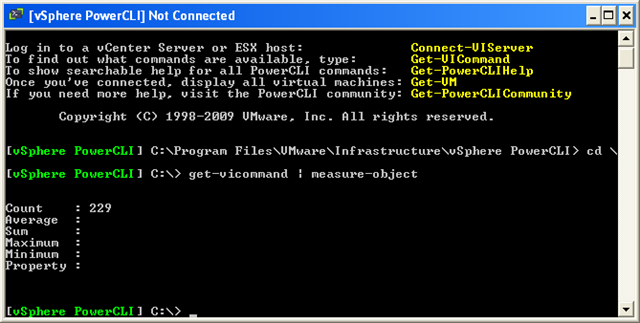
In the previous version of PowerCLI we had 165 great cmdlets to play with and didn’t we have fun, now in the new version (Download Here) we have a whopping…..

image

That’s right, an extra 68 cmdlets (4 of the old cmdlets were renamed from the previous version), bring on the fun !

So as well as the increased performance, what do we now have to play with ? here is a quick summary of the new cmdlets and what they do…. Continue reading →

PowerShell Gotcha – Export-CSV, Out-GridView and others

I came across this one a little while back and was hoping it would be fixed in V2, I haven’t seen anyone else mention it so I thought I would add it to my blog as a warning to other PowerShell freaks like me….

I have changed the example to be more universal so you get the point:

I was creating a list of my servers and how big the disks were, to do this I decided to create a collection of custom PS objects so I could add further details to the object later as below:

Continue reading →

Onyx – Why Learn PowerCLI ?

The PowerCLI Team yesterday published with the Onyx Project a great tool with lots of potential. The blogging community received Carter’s announcement enthousiastically (see my previous post The Onyx has landed).

As a casual PowerCLI user you might think, the product has a strange name but it is the answer to all my scripting and automation needs. Why should I bother learning all these PowerCLI cmdlets while this tools produces working code. But think again !

A word of warning by the Surgeon General, or Alan and Luc in this case 😉

Continue reading →

The Onyx has landed

A couple of months ago Carter Shanklin (Product Manager of Automating the World) teased us all with a wonderful application which creates PowerCLI scripts for you by tracing your actions in the vCenter Client.

The scripts it produces are not PowerCLI perfect but they do produce a raw format of a script which can be used to find the awkward bits of the API that are hidden in the back of the API documentation.  The true power in PowerCLI will still be the manipulation of the cmdlets.

Continue reading →

VESI & PowerGUI PowerPack V2

V2 Nodes

As the official download count for V1 of my PowerPack has now hit over 1000 downaloads (I cant thank you all enough), I have now released V2 of my PowerPack for VESI and PowerGUI, this is more like the version I wanted to release first time around.

In the first PowerPack, I took a fair few snippets of code I had written on my blog and added these to the PowerPack to get people interested, now in Version 2 I have added even more content, more nodes, more actions and a fair bit of user requested features.

As you can see from the image on the left, there are a fair few nodes (so many I had to cut and paste the image together as they wouldn’t all fit in one screen capture).

There are also some new actions (see screenshots below).

If you have ESXi hosts you should find this useful, now you will be able to download the current firmware state to your windows machine with the click of a button, deploy it back and also reset them back to default configuration (seen below).

I was also requested to add the vCheck script into this version so you could run ad-hoc reports on customer sites, you will find this under the General tab.

You will also find many more VM nodes, most of which where inspired by Armin van Lieshout who was a great help during the testing phase and even sent through his own code for me to include.  Thanks Armin.

Thanks to the other beta testers who sent me some great feedback (most of which is in here), I couldn’t have done it without you guys !  I also want to thank Kirk Munro who helped me out with a few coding or should I say User errors in V1 of this PowerPack 😉

Continue reading →

vCheck Hypervisor style

The thing I love about adding my work to my site is that some people pick up what I have created and expand on it, I like to think that’s a sign of firstly my scripts being interesting enough to expand and secondly my scripts being so well written that anyone can pick them up and tailor them to their needs.

Following the initial additions that were added to v3 of vCheck, Raphael from http://www.hypervisor.fr/ has expanded my script somewhat further to include even more amazing functionality.

He has added the following areas of reporting:

  • Host Ballooning
  • Datastore Over Allocation
  • Snapshot Oversize
  • VCB garbage
  • VMkernel warning check for ESX/ESXi (with deduplication)
  • invalid or inaccessible VM
  • Inapshot add/remove summary
  • Time build
  • NTP (service only) check

I will certainly make sure these are included in V4 with multiple other entries but in the meantime if you would like to download his excellent version then please check out his site, the posts are in French but he is nice enough to keep the script pure English 😉 Continue reading →

PowerCLI – Where do I start ?!

Recently I have been asked a few times where to start when trying to learn PowerCLI and Powershell, there are many learning resources available for PowerShell, all you need to do is Google “Powershell basics” and off you go but what about PowerCLI ?

Well first on the list would have to be the book ‘Managing VMware Infrastructure with Windows PowerShell’ by Hal Rottenberg.  Its a great book with loads of examples and Hal has a great way of writing where it keeps you amused whilst still learning.

Secondly there is my blog post which takes it right back to basics and tells you how to install PowerCLI.

Thirdly, there are a number of great PDF files which you can read to help you along your journey, starting from the basics up to the more interesting ones including cmdlet references and in depth features:

Continue reading →