Tag Archives: PowerCLI

PowerCLI: Shutdown your Virtual Infrastructure

Imagine your Power intake to your rack has failed, imagine your UPS has kicked in but is about to run out of power, you need to quickly shut down all of your virtual infrastructure…. quick run !

Or, you could let PowerCLI do the work for you and help you safely shutdown your entire virtual infrastructure, you could even tell your UPS software that when it gets to a certain amount of battery life left that it needs to run this script to safely shut things down.

Continue reading →

PowerCLI: Copying Advanced Host Configuration

I was asked in my script list comments if there was a way to copy the ESX host advanced configuration from one host to every other host in the cluster, thankfully PowerCLI gives us some nice cmdlets to work with that make this task very easy…

Get-VMHostAdvancedConfiguration and Set-VMHostAdvancedConfiguration

So first of all lets list the current advanced configuration of one of our hosts using Out-GridView:

Continue reading →

VESI & PowerGUI PowerPack V3

V3 Nodes

The popularity of this PowerPack never ceases to amaze me, as if it wasn’t enough to have more than 2500 downloads already it was also mentioned by the great Eric Sloof at the recent Dutch VMUG, check out a video of the session here (if you speak Dutch) or check out his slide deck here.

So, I have been working on V3 of the PowerPack and have just finished the final touches.

What’s new ?

To be honest I cant remember everything that is new but as you can see from the left hand node list there are a fair few new nodes which may help in your day to day admin life.

I have not only added my own enhancements but also included a bunch of bug fixes, (thanks Arnim and Luc) and also included some other scripts from Arne over at ICT-Freak.nl

I have re-organised some of the nodes so when you add the latest PowerPack you will receive a prompt like the below:

V3_Move_Nodes

Make sure you click yes to re-organise the nodes into the new areas.

I have also made a dependency on PowerCLI V4.0 Update 1 so if you do not have that version installed then please install it before upgrading to the latest PowerPack, you will not need vSphere 4.0 U1 as PowerCLI 4.0U1 is backward compatable.

In the latest version of PowerCLI VMware have made the connection methods a million times better, if you look at the code you will now see how easy it is to paste your new code into the nodes and create your own enhancements.

So what’s next for V4 ?  More of the same great scripts, more enhanced nodes, a move towards more actions and less nodes, and I am also thinking about opening this up as a community project, we can all add our own scripts to the PowerPack as a community effort and make this THE ULTIMATE FREE TOOL to have when administering or consulting VMware systems, express your interest via the comments please.

If your not a scripter but would like to see something in the PowerPack to make your life easier also please let me know via the comments.

Use the automatic update feature or download the new version now from below.

PowerCLI Quick Reference Guide

Way back in the days of the “Virtual Infrastructure Toolkit” I released a quick guide for people to keep on their desk or in their pocket, the idea was it would give you enough information about the VITK whilst still being on a single (double sided) page.

Well things have moved on and the days of the VITK are no more, now we have PowerCLI and aren’t we pleased !

So to keep us up to date and so that we still have a quick reference, I have updated the single sheet to include all the new cmdlets and I also threw in a few other resources too.

Please download, print off and fold, keep it with you to help with your day to day usage of  PowerCLI (or is that just me ?!?). Continue reading →

Exploring the PowerCLI cmdlets – Get-NicTeamingPolicy Part 2

In my previous post “Exploring the PowerCLI cmdlets – Get-NicTeamingpolicy” I showed you how to output some great looking information for vSwitches which detailed all the information we may ever need to know, so whilst on the same cmdlet lets look at PortGroups, these have the same type of settings and the same cmdlet also works against a PortGroup object, as before we can display this information with a single one liner… Continue reading →

Exploring the PowerCLI cmdlets – Get-NicTeamingPolicy

One of the new cmdlets from PowerCLU 4.0 Update 1 is Get-NicTeamingPolicy, so what does this do ?

It retrieves the Nic teaming policies of the specified virtual switches and virtual port groups, obviously !

So how can we use this cmdlet ?

Well, as it details the teaming policies of either a virtual switch or a portgroup then we will need to give it a…virtual switch or a portgroup, so how do we do this, lets try a one-liner:

Get-VMHost | Get-VirtualSwitch | Get-NicTeamingPolicy

This will do as it says on the tin, get a list of the hosts, for each of these it will get a list of virtual switches attached to the hosts and then list their nic teaming policies, the output is as so:

Continue reading →

vSphere 4.0 Quick Start Guide is here

image

Its here, I’m an author, watch out JK Rowling !

Its been a while coming but the vSphere 4.0 Quick Start Guide is now available to buy on Amazon (US), we are working at getting it on the UK site but I’m just pleased to see it out there and available to buy.

This book is a co-authored publication bought to you from some of the leading names in VMware bloggers and admins, and they also asked me to contribute too 🙂

The book is designed for you to carry around with you, its not a heavy duty full novel but more of a VMware admins help book which can be referred to when you are in the damp dark datacenter at 4am in the morning with no internet connection !

Having said that there is definitely something in there for everyone, whether you are new to VMware or a seasoned Pro.

Throughout the book you will find great tips, real life situations and numerous PowerCLI examples.

If you haven’t yet heard of this book then please read these wonderful comments already left on the Amazon post.

If you have read it then please, leave your comments along with the others.

Buy your copy now ! in fact buy two !

PowerCLI to SQL Databases

One of the things I love about PowerShell is how versatile it is, its a wonderful framework which can slot pieces of a puzzle together to create a masterpiece, Now I know it exists I can see every day uses and needs for PowerShell, it fits into every nuck and cranny.

Take for example my SnapReminder script, the fact that you can pull VMware Information from your vCenter, then run the results by Active Directory and finally push it through an SMTP server to complete the final piece of the puzzle astounds me, the only limit to PowerShell is your imagination.

The other day I was watching Twitter when someone asked how to do a particular task, they wanted to pull information from the VMware Infrastructure and update some existing data in an  SQL database, I watched as multiple answers were given to this person…. do a database synchronisation…..buy this  third party tool…..you cant do that…..extract it as a csv, convert it to xml, import it into here, spin around three times and say alacasam !

My instant answer was of course PowerShell (that seams to be my instant answer for most things of late).  The reply was, can you access SQL with PowerShell then ?  YES

I don’t think I personally have come across anything you couldn’t do in PowerShell given enough time and resources !  Lets talk through this scenario.

Continue reading →

PowerCLI: Bring on the next version

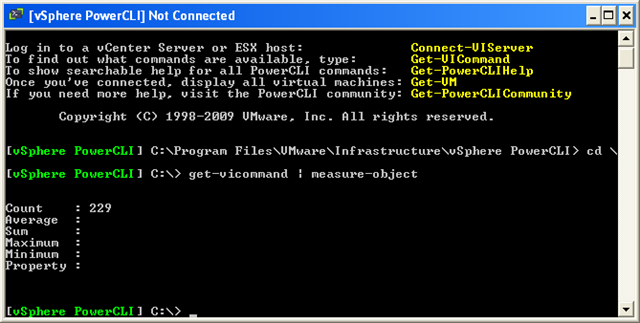
In the previous version of PowerCLI we had 165 great cmdlets to play with and didn’t we have fun, now in the new version (Download Here) we have a whopping…..

image

That’s right, an extra 68 cmdlets (4 of the old cmdlets were renamed from the previous version), bring on the fun !

So as well as the increased performance, what do we now have to play with ? here is a quick summary of the new cmdlets and what they do…. Continue reading →

Onyx – Why Learn PowerCLI ?

The PowerCLI Team yesterday published with the Onyx Project a great tool with lots of potential. The blogging community received Carter’s announcement enthousiastically (see my previous post The Onyx has landed).

As a casual PowerCLI user you might think, the product has a strange name but it is the answer to all my scripting and automation needs. Why should I bother learning all these PowerCLI cmdlets while this tools produces working code. But think again !

A word of warning by the Surgeon General, or Alan and Luc in this case 😉

Continue reading →