Author Archives: Alan

About Alan

Alan Renouf has a role of Automation Frameworks Product Manager at VMware responsible for providing the architects and operators of the cloud infrastructure with the toolkits/frameworks and command-line interfaces they require to build a fully automated software-defined datacenter. Alan is a frequent blogger at http://blogs.vmware.com/vipowershell and has a personal blog at https://virtu-al.net. You can follow Alan on twitter as @alanrenouf.

PowerCLI: Bring on the next version

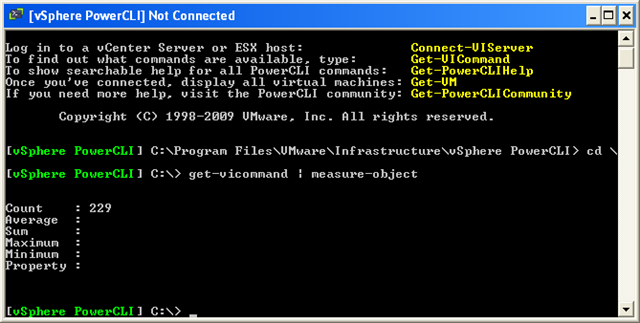
In the previous version of PowerCLI we had 165 great cmdlets to play with and didn’t we have fun, now in the new version (Download Here) we have a whopping…..

image

That’s right, an extra 68 cmdlets (4 of the old cmdlets were renamed from the previous version), bring on the fun !

So as well as the increased performance, what do we now have to play with ? here is a quick summary of the new cmdlets and what they do…. Continue reading →

PowerShell Gotcha – Export-CSV, Out-GridView and others

I came across this one a little while back and was hoping it would be fixed in V2, I haven’t seen anyone else mention it so I thought I would add it to my blog as a warning to other PowerShell freaks like me….

I have changed the example to be more universal so you get the point:

I was creating a list of my servers and how big the disks were, to do this I decided to create a collection of custom PS objects so I could add further details to the object later as below:

Continue reading →

Onyx – Why Learn PowerCLI ?

The PowerCLI Team yesterday published with the Onyx Project a great tool with lots of potential. The blogging community received Carter’s announcement enthousiastically (see my previous post The Onyx has landed).

As a casual PowerCLI user you might think, the product has a strange name but it is the answer to all my scripting and automation needs. Why should I bother learning all these PowerCLI cmdlets while this tools produces working code. But think again !

A word of warning by the Surgeon General, or Alan and Luc in this case 😉

Continue reading →

The Onyx has landed

A couple of months ago Carter Shanklin (Product Manager of Automating the World) teased us all with a wonderful application which creates PowerCLI scripts for you by tracing your actions in the vCenter Client.

The scripts it produces are not PowerCLI perfect but they do produce a raw format of a script which can be used to find the awkward bits of the API that are hidden in the back of the API documentation.  The true power in PowerCLI will still be the manipulation of the cmdlets.

Continue reading →

VESI & PowerGUI PowerPack V2

V2 Nodes

As the official download count for V1 of my PowerPack has now hit over 1000 downaloads (I cant thank you all enough), I have now released V2 of my PowerPack for VESI and PowerGUI, this is more like the version I wanted to release first time around.

In the first PowerPack, I took a fair few snippets of code I had written on my blog and added these to the PowerPack to get people interested, now in Version 2 I have added even more content, more nodes, more actions and a fair bit of user requested features.

As you can see from the image on the left, there are a fair few nodes (so many I had to cut and paste the image together as they wouldn’t all fit in one screen capture).

There are also some new actions (see screenshots below).

If you have ESXi hosts you should find this useful, now you will be able to download the current firmware state to your windows machine with the click of a button, deploy it back and also reset them back to default configuration (seen below).

I was also requested to add the vCheck script into this version so you could run ad-hoc reports on customer sites, you will find this under the General tab.

You will also find many more VM nodes, most of which where inspired by Armin van Lieshout who was a great help during the testing phase and even sent through his own code for me to include.  Thanks Armin.

Thanks to the other beta testers who sent me some great feedback (most of which is in here), I couldn’t have done it without you guys !  I also want to thank Kirk Munro who helped me out with a few coding or should I say User errors in V1 of this PowerPack 😉

Continue reading →

vCheck Hypervisor style

The thing I love about adding my work to my site is that some people pick up what I have created and expand on it, I like to think that’s a sign of firstly my scripts being interesting enough to expand and secondly my scripts being so well written that anyone can pick them up and tailor them to their needs.

Following the initial additions that were added to v3 of vCheck, Raphael from http://www.hypervisor.fr/ has expanded my script somewhat further to include even more amazing functionality.

He has added the following areas of reporting:

  • Host Ballooning
  • Datastore Over Allocation
  • Snapshot Oversize
  • VCB garbage
  • VMkernel warning check for ESX/ESXi (with deduplication)
  • invalid or inaccessible VM
  • Inapshot add/remove summary
  • Time build
  • NTP (service only) check

I will certainly make sure these are included in V4 with multiple other entries but in the meantime if you would like to download his excellent version then please check out his site, the posts are in French but he is nice enough to keep the script pure English 😉 Continue reading →

PowerCLI – Where do I start ?!

Recently I have been asked a few times where to start when trying to learn PowerCLI and Powershell, there are many learning resources available for PowerShell, all you need to do is Google “Powershell basics” and off you go but what about PowerCLI ?

Well first on the list would have to be the book ‘Managing VMware Infrastructure with Windows PowerShell’ by Hal Rottenberg.  Its a great book with loads of examples and Hal has a great way of writing where it keeps you amused whilst still learning.

Secondly there is my blog post which takes it right back to basics and tells you how to install PowerCLI.

Thirdly, there are a number of great PDF files which you can read to help you along your journey, starting from the basics up to the more interesting ones including cmdlet references and in depth features:

Continue reading →

UK London VMware User Group

The next UK London VMUG has been announced, if you have not been before I highly recommend it and this time there is an added treat, Jonathan Medd will be presenting a pre-event on PowerCLI, at this point in time I don’t think I will be able to attend as I am unable to get time off at work (I’m gutted) but if that changes I will also be catching Jonathans excellent session.

Firstly, the VMUG will be held on Tuesday 24th November, and is going to focus fairly heavily on vSphere.  If any of you would like to present on a vSphere-related topic with which you have good, recent experience, please get in touch with Alaric as soon as possible. This could be any of installation, upgrade (hosts, VC, VMs), networking, storage, design changes, operations changes, backup, DR, third party tools, and so on. There are some fantastic giveaways that are available to anyone who presents a session, so please do get in touch with him via the forum here: http://communities.vmware.com/thread/241557?tstart=0

Continue reading →

vCheck 3.1 ?

Whooops, looks like I got a couple of things wrong and I also missed something out that a few people were asking for, You can call this a minor release. I think you should be able to change these yourselves as they are very straight forward and its not worth me re-issuing the script as you would have to change your preferences again which is actually more work !

Continue reading →

vCheck (Daily Report) V3

Initially when I started this script I wanted people to be clear that this was a report that was going to give you a daily summary of any issues which may exist in your Virtual Infrastructure, from the beta testing I did to a select few it was clear that they were expecting this to send them a full inventory of their infrastructure.

That wasn’t the point in this script and I think people now have the idea that this is more of an issue log than an audit script so I will now revert to my original name of…. vCheck.

The key thing to remember is that if an issue does not exist in a particular area then it will not show in the output, when and if issues turn up they will start appearing in the output almost like magic !

I want to thank everyone who is using this script and those who have left a comment, even if its just to say how much you like it !

I especially want to thank Raphaël SCHITZ (http://www.hypervisor.fr/) for all his contributions, he has added some great features to this version and helped me take it to a new level.

The previous version already reported on these areas: Continue reading →