Author Archives: Alan

About Alan

Alan Renouf has a role of Automation Frameworks Product Manager at VMware responsible for providing the architects and operators of the cloud infrastructure with the toolkits/frameworks and command-line interfaces they require to build a fully automated software-defined datacenter. Alan is a frequent blogger at http://blogs.vmware.com/vipowershell and has a personal blog at https://virtu-al.net. You can follow Alan on twitter as @alanrenouf.

London VMware User Group – 25th Feb

I have been asked to do a session at the London VMUG on 25th February 2010, after my previous session where I took the attendees through a beginners introduction to PowerCLI, I think I will throw them straight in this time and show them how we can configure ESXi using PowerCLI.

ESXi is obviously a hot topic at the moment and the configuration of ESXi without the service console access is proving to be difficult for many users.  This session will take you through the configuration of a host from start to end showing you how easy it is and highlighting some of the scripts and cmdlets explained in my previous post.

image


As a bonus I will also be giving away a set of “VMware vSphere Pro Series Training Vol. 1: View, ThinApp, Nexus 1000V, and PowerCLI” videos during my session, with thanks to the great guys at TrainSignal, be sure to bring your questions along for a chance to win this great prize !


There will obviously be all the other great sessions which normally take place and there is even a rumour that an all powerful PowerCLI expert from the states will be descending from upon high to give us the latest and greatest automation information from VMware !

I am personally looking forward to a “Real life” session which my colleagues Jonathan Medd and Vic Milne will be delivering, this will be an interesting presentation on how they moved both datacenters and storage devices with (nearly) no downtime !

Also on my agenda will be the Enterprise Cloud presentation from vStu that is sure to be full of both useful information in a friendly and native Australian dialog and humour.

As always the details for the VMUG can be found on the forum here.

If you are looking to deploy ESXi and are having trouble performing or have had trouble performing a certain task then please do let me know via the comments of this post so I can be sure to include this. – It would also give you bonus points when in the running for the TrainSignal video 🙂

PowerCLI: Configured Maximums – Storage

With vSphere introduced some new maximum’s which we not only have to memorise for the exams but also have to keep in mind when designing and using your infrastructure.

In the back of your mind when adding a new host to a cluster you should always be thinking, how many hosts should be in this cluster ? or when adding another LUN to your clustered hosts, how many datastores should I have as a maximum before it starts impacting my performance and how many paths are supported ?

The answer to these questions (in my case anyway) is to use PowerCLI to check them 🙂

I will of course add these to the next version of vCheck so they are automatically checked for but in the meantime here are some quick one-liners to check your infrastructure against the configured maximums for storage, I will add more as I write them:

Continue reading →

LucD-2 here to help PowerShell self evolve

Untitled

For the PowerCLI lovers out there you may want to check out the recent Get-Scripting Podcast.

This month Jonathan and I have interviewed the master of PowerCLI himself, Luc Dekens or LucD on the forums and LucD22 on twitter.

Anyone who has ever visited the PowerCLI forums will know who Luc is, he also has an amazing blog with great walkthroughs on some of the more complicated PowerCLI areas including the SDK, events and alarms.

The rumour is that Luc is actually the next version of a terminator robot, here to help PowerShell self evolve, if you are interested in PowerCLI or automating VMware then please download episode 15 of the Get-Scripting podcast here:

http://get-scripting.blogspot.com/2010/02/get-scripting-podcast-episode-15-luc.html

Automated VM provisioning

The use cases for PowerCLI and automation continue to amaze me, a couple of nice use cases I have seen recently involve automating the deployment of VM’s for various reasons.

The first reason, performance, what happens when a VM which is sat there for most of the year suddenly becomes busy and doesn’t have enough resources to satisfy whatever service it is trying to provide, do you add more ram, more CPU, what happens when you get to the maximum 8 CPU’s and the maximum vSphere VM memory of 255GB, do you then deploy a second VM and a third etc etc

Take this scenario into consideration:

You work in the UK for a county wide radio station, most of the time your virtualised cluster of web servers is sat there doing nothing, serving the odd hit now and again…but then it snows !

As we know, the UK can not handle snow at the best of times, the country grinds to a halt, the only means of knowing if your children’s school is closed is to check the local radio station’s website….enter our problem.

As you are also snowed in and unable to make it to the office you are unable to build the VM’s and add them to the cluster to allow the existing VMs which are now stuck on 100% CPU usage whilst you dig your car out.

Wouldn’t it be nice if we could have an automated response to this ? I held aloft my sword and said “With the power of CLI” (He-Man fans will get this).

I have two methods for this, the first one is a great script and the second is a bit of fun to show exactly how powerful PowerShell and PowerCLI can be. Continue reading →

PowerCLI: Changing a VM IP Address with Invoke-VMScript

One of the cmdlets that has been much improved in the recent version of PowerCLU 4 U1 is the Invoke-VMScript cmdlet,

This cmdlet runs a script or command inside the guest OS of each of the specified virtual machines. To run Invoke-VMScript, the user must have read access to the folder containing the virtual machine and a Virtual Machine.Interaction.Console Interaction privilege.

The virtual machines must be powered on and have PowerShell and VMware Tools installed.

Network connectivity to the ESX system hosting the virtual machine on port 902 must be present.

You must also have both the Host and guest credentials available.

One question asked of me recently was “Is there a way to set the IP address of some windows virtual machines with PowerCI ?”.

So with the power of the invoke-cmdlet in the following example you can see how you can change the ip address by using the netsh command inside the VM.

As a note, you no longer need PowerShell inside the guest OS for this cmdlet to work, as you can see below I am calling a batch command, you can also use this cmdlet against *nix machines to run shell commands.

This of course can easily be adjusted to read all ip addresses from a csv file or text file and apply them to multiple virtual machines if needed.

Continue reading →

Learn PowerCLI by video

So you want to learn PowerCLI, if your not a book kinda person and haven’t purchased Hal Rottenberg’s great book, Managing VMware Infrastructure with Windows PowerShell then there is great news for you.

Trainsignal have let it slip that coming soon to a website near you will be….

Managing VMware vSphere with PowerCLI – Hal Rottenberg

  • Video 1 Introduction to Power CLI
  • Video 2 PowerShell Basics
  • Video 3-1 PowerCLI Concepts – Part 1
  • Video 3-2 PowerCLI Concepts – Part 2
  • Video 4 Power CLI in the Real World
  • Video 5 PowerCLI Cmdlet Deep Dives

So you not only get to learn PowerCLI but you also get to see the man behind the book, the man behind the podcast and the man behind the MVP – Hal himself.

Continue reading →

PowerCLI: Working with events

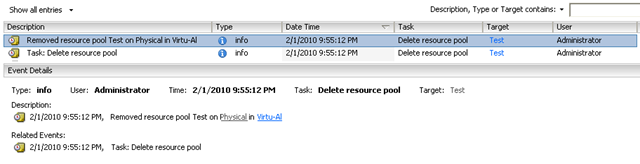
Today a question was asked of me, someone asked how to find out who had deleted a ResourcePool, now im not one to get anyone into trouble but I also cant resist a scripting challenge so here was the process I used to write the following one-liner:

Get-VIEvent | Where { $_.Gettype().Name -eq "ResourcePoolDestroyedEvent"} | Select CreatedTime, UserName, FullFormattedMessage

Ok, so we know that everything we do in the vSphere client produces an event so there must have been an event record, in this record we know that the person is recorded as we can easily create a test resource pool and delete it, this will allow us to test the information we need:

image

Continue reading →

PowerCLI: Virtual Machine disk usage

Recently I have had a few comments on an old post I wrote showing a one-liner to get the VM’s disk sizes for each VM, I was asked if there was a way to export this information into a CSV file.

The easy answer is yes but what you need to do is build up a container and then add each part of the information to the container, this is quite common practice in PowerShell, its a great technique where you can basically build and populate your own information and then just add to it, once you are completed you can then take your container and export it to whatever format you wish, for example:

The one-liner mentioned in my previous post simply outputted the data one VM at a time to the screen, whilst this was great for looking at the information, when we try and export it things start to go wrong !

The new script, below, may take up more lines but is far more efficient and adaptable.

image

Continue reading →

Top 10 Virtualisation blogger

All I can say is WOW ! (and Thank You)

I have been watching and voting in Eric’s polls since I started in virtualisation and never ever expected to see my name up there in lights, and in the top 10 too !

Thanks to everyone who voted for me, I really really appreciate it, this is exactly the reason I write my scripts and do not charge for them (despite pressure to do so) I could not believe it when I was told about this Sunday night, I think I am still dancing around in my head (not suitable in the office).

Congratulations to all other people mentioned in the top Virtualisation blogs and especially to Duncan of Yellow-Bricks.com for taking the Number 1 slot again, very well deserved too !

Number 10

I really wish I had changed my twitter picture before hand though 😉