
Why you should always train in simulation first.
If you have followed my projects over the years, you know that whenever I start tinkering with hardware, robotics, or automation, I love bridging the gap between physical machines and practical software.
Recently, I set myself a new challenge: build an autonomous, physical chess-playing companion robot. Not a chess program on a screen, but a real robotic arm that reaches out over a physical chessboard, picks up Staunton pieces with its claw, places them on their destination squares, sweeps captured pieces off to the side, and provides live voice commentary while it plays.
Even better, I wanted this to be a family project. Something that could play gentle, educational games with my 8-year-old to teach piece development, offer a sharp tactical match for my 20-year-old, and ramp up to a master tier when I fancy a serious challenge.
Before plugging in a single servo cable or letting metal hardware loose on a wooden board, I made one critical architectural decision: build and train the entire system inside a high-fidelity 3D digital twin first.
Here is how we built the simulation, the real robotics bugs it caught before they could break anything, and why simulation-first saved me countless stripped gears.
Key architectural decision: high-torque digital bus servos have zero remorse. If an inverse kinematics calculation has a minus sign in the wrong place, the arm will bend backwards 180 degrees or plunge straight through the wooden board. Simulating first completely prevents physical damage.
Why Simulation First? Respect the Servos
Robotic arms with high-torque digital bus servos execute commands immediately. If your inverse kinematics has a minus sign in the wrong place, the arm will not politely ask for clarification. It will bend backwards 180 degrees over its shoulder, or plunge straight down through the wooden cabinet, stripping gearbox splines and sending chess pieces flying across the room.
Physical Reality vs Digital Twin

Without Simulation:
Code IK -> Send PWM to Servos -> Arm slams table -> Broken gear

Simulation First:
Code IK -> 3D WebGL Digital Twin -> Inspect Trajectory
        -> Fix Joint Signs & Offsets -> Safe Real Execution
By building a web-based 3D digital twin running in the browser on Three.js, I got an instant feedback loop. Every joint angle, claw clearance, speed curve, and piece pickup could be verified visually in real time before a single pulse went anywhere near physical hardware.
Assembling the Robots: CAD, STLs, and URDF
To make the digital twin honest, I did not use primitive cylinders or placeholder blocks. I loaded the exact CAD models the physical robots use.
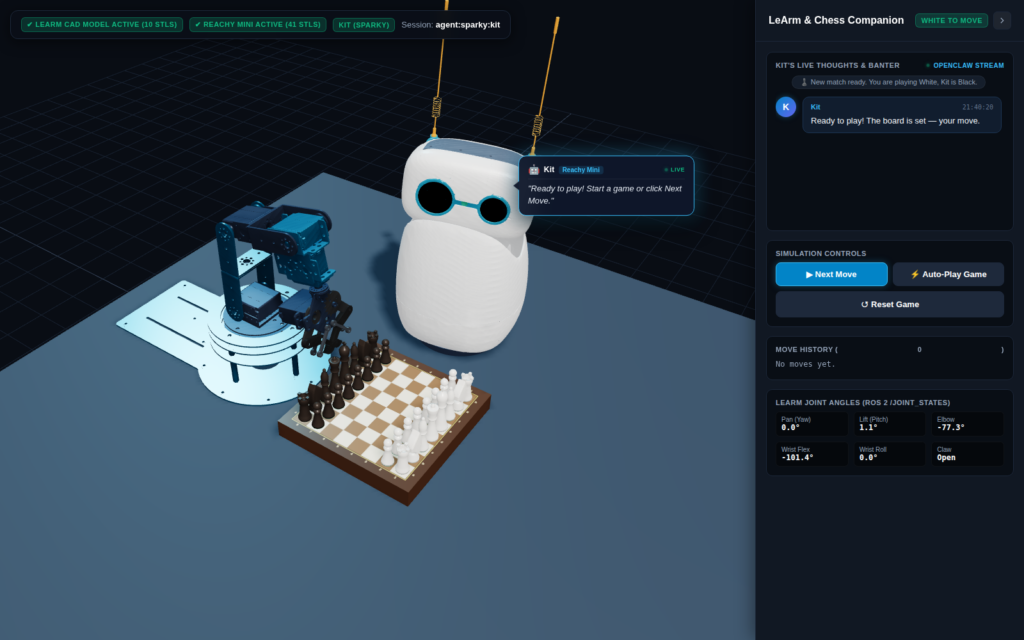
The manipulator arm (LeArm). For the physical chess player I used the LewanSoul LeArm, a 5-DOF articulated robot arm: turntable base, shoulder lift joint, elbow joint, wrist pitch, wrist roll, and a mechanical gear-linked parallel gripper. All 10 official STL meshes render through a Three.js URDF loader, with the exact link lengths mapped from shoulder to gripper.
The companion robot (Reachy Mini). Sitting beside the board is Kit, my Reachy Mini companion from Pollen Robotics. Six-DOF Stewart platform neck, animated stereo cameras, and spring-mounted flexible antennas. I imported the full 41-STL mesh tree so Kit can look down at the board, follow the moves, and show a bit of personality during the game.
Catching the Real Robotics Bugs in the Browser
Building the digital twin paid for itself almost immediately. As soon as I hooked up the first inverse kinematics solver, several mathematical and physical bugs appeared that would have caused instant hardware damage in the real world.
Bug 1: the arm facing the wrong way. The initial analytical IK solver did the shoulder, humerus, and forearm angles with the law of cosines. The maths looked valid. In the Three.js view, though, the arm bent backwards over its shoulder into empty air, away from the chessboard.
The URDF specification held the answer: the elbow and wrist flex joint axes are defined as [0, -1, 0], so positive angles rotate the joints upward and backwards, while the solver assumed positive angles pitched forward toward the table. Caught in the simulator, fixed with corrected trigonometric signs, and the arm now pitches naturally forward over the board.
Trigonometric Coordinate Transform:
th1 (Shoulder Lift) = psi - beta1
th2 (Forearm)       = th1 + bend
Elbow Joint         = -bend           <-- Negative pitch bends toward board
Wrist Flex Joint    = th2 - th3       <-- Positions gripper perpendicular to board
Bug 2: base collision and board clearance. Bounding box measurements on the LeArm base mesh showed the front metal bracket extends 8.1 cm forward from the turntable pivot. With the chessboard at the front edge of the table, the robotic base sliced directly through the wooden board. I recalculated the board centre to 18.0 cm with 18 mm squares, leaving a clean 15 mm safety gap between the metal turntable and the board edge, with all 64 squares still inside the arm’s reach envelope.
Bug 3: pincers inverted. On the first move attempt, the pincers did the exact opposite of what was intended. They sat pinched shut at rest, opened wide right on top of the piece, and tried to lift it with fingers spread open. In the URDF, grip_left at 0.0 means fully open fingers, while negative values pull the mechanical tendon closed. I re-mapped the servo limits so the claw rests open at 0.0, clamps securely to -1.25 around the piece collar, and opens cleanly back to 0.0 on release.
Bug 4: board scraping and top-grasp elevations. Initially the claw descended all the way to table height, and the fingers collided with the board surface and neighbouring pieces. The fix was piece-specific top grasps: instead of reaching for the base, the arm descends to the narrow neck collar or finial of each piece.
- Pawns are grasped at 28 mm above the board.
- Rooks are grasped at 32 mm above the board.
- Knights are grasped at 34 mm above the board.
- Bishops are grasped at 40 mm above the board.
- Queens are grasped at 46 mm above the board.
- Kings are grasped at 50 mm above the board.
This keeps the claw fingertips 6 mm to 10 mm above the board surface at all times, so no more board scraping.
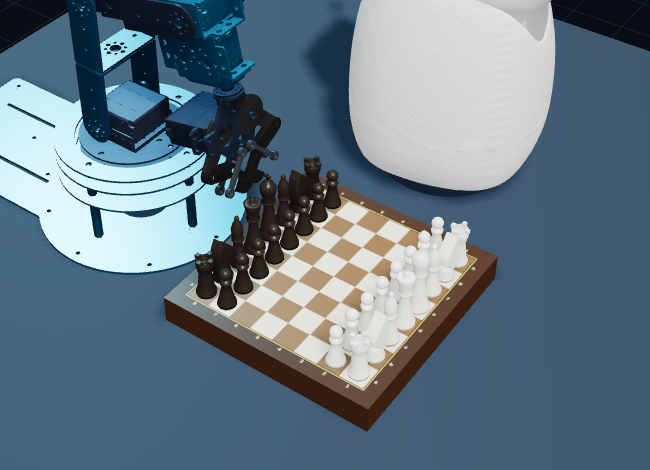
Bug 5: holding pieces in the centre of the pincers. In early drafts the piece was attached to the wrist mount origin, so it drifted whenever the arm changed pitch. The physics engine now calculates the live world midpoint between the left and right finger pads and locks the piece to that exact point through the whole trajectory.
Bug 6: graveyard placement away from the companion. When Black captures a piece, the robot sweeps it off the board into the graveyard. Originally that was the left side of the table, which swung the arm directly into Reachy Mini. All graveyard waypoints now route to the right side of the board, keeping the transit path completely clear of the companion robot.
Teaching from Age 8 to Master: Multi-Tier AI
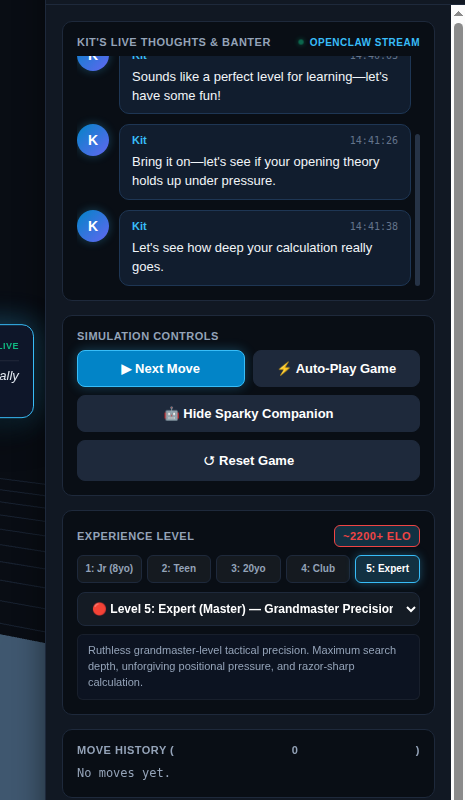
To make the game work for my 8-year-old and still challenge my 20-year-old, the engine has five distinct experience tiers.
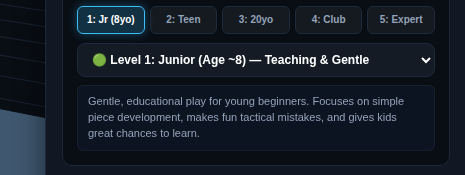
- Level 1 Junior, around 500 ELO for young children: 1-ply search depth with a 45% blunder allowance, creating encouraging learning opportunities.
- Level 2 Apprentice, around 900 ELO for casual play: 2-ply calculation with an 18% second-best move rate, defending pieces while leaving room for tactical combinations.
- Level 3 Intermediate, around 1400 ELO for collegiate play: strict 3-ply minimax with alpha-beta pruning and full piece-square positional tables.
- Level 4 Advanced, around 1800 ELO for club competitors: 4-ply search evaluating bishop pairs, rooks on open files, and coordinated attacks.
- Level 5 Expert, around 2200 ELO for master level: deep calculation, endgame king-activity heuristics, and uncompromising tactical precision.
Adding Personality: Live Spoken Banter
A chess companion should feel alive. The simulator hooks into OpenClaw and Hermes, powered by NVIDIA Nemotron on local and cloud endpoints.
Whenever a move happens, Kit evaluates it in context and delivers a natural spoken remark, shown in a 3D speech bubble anchored next to Reachy Mini:
- On Level 1, Kit highlights good piece development and offers cheerful encouragement.
- On Level 3, Kit trades tactical observations with witty chess references.
- On Level 5, Kit delivers sharp master-level observations that challenge the depth of your calculation.
To stop the head snapping around mid-sentence, I added gentle harmonic motion to the head and antennas so they sway naturally while Kit speaks.
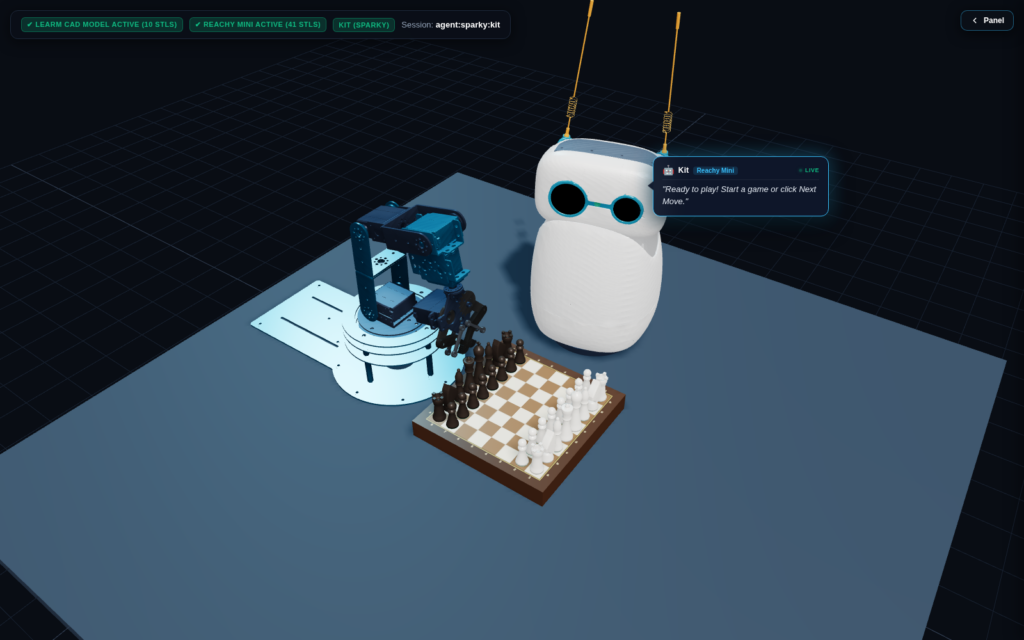
Summary of the Simulator Features
- Runs a complete 3D digital twin in any modern web browser using Three.js and WebGL.
- Simulates physical 5-DOF LeArm kinematics and 6-DOF Reachy Mini companion gestures.
- Five calibrated skill levels, from age 8 beginner up to master.
- Full-screen mode with collapsible sidebar panels and keyboard hotkeys.
- Toggle to hide the companion robot when demonstrating pure LeArm operation.
- Locks player input while the robot arm is in motion for realistic turn sequencing.
- Reconnects automatically on boot using systemd user services and user lingering.
What Comes Next: Part 2
With the digital twin fully operational, every trajectory tested, and the collision clearances validated, the software is ready.
In Part 2, the physical LeArm gets plugged in over USB HID: mapping the real pulse-width-modulation servo signals from the kinematics model, calibrating the tabletop coordinates, and letting Kit play its first game on a real wooden board.
Stay tuned, and let me know in the comments what you think of the simulation-first approach. Has hardware ever taught you the same lesson the hard way?